Why are images a big line on your Sharetribe bill?
How does Sharetribe bill an image?
What do Sharetribe images cost in dollars?
Which free fixes should you do first?
What does moving images to Cloudflare R2 involve?
What do you give up by moving images off Sharetribe?
Subscribe and you will promptly receive new published articles from the blog by mail
Under Sharetribe usage pricing, images are often one of the largest lines on the bill, because each image costs 340 credits the first time it’s requested in a calendar month, whatever its size. Every view and every upload adds smaller charges on top. Do the free fixes first, decide on any image migration before you sign one of the 12-month Sharetribe credit commitments, and move photos to Cloudflare R2 only if what remains justifies the work.
Your sellers did exactly what you asked them to. They added more photos, and conversions went up. Under usage pricing, every one of those photos also has a price tag.
Existing Sharetribe marketplaces move to usage pricing on December 1, 2026, so any Sharetribe pricing 2026-2027 budget needs a new image line. Below, we break down the real Sharetribe image cost, which fixes are free, and when moving photos to Cloudflare R2 is worth the effort.
- Images are charged four ways: a unique-image charge that grows with how many different photos are seen, downloads and transfer that grow with traffic, and uploads that grow with file size.
- First image view credits are 340 per image per month, whatever its size, and crawler visits count.
- A credit commitment cuts the bill with no code, but it's a minimum monthly payment for 12 months that you can't cancel or downgrade.
- If you might move images within the next 12 months, decide before you commit, or the commitment absorbs most of the saving until it ends.
- Do the free Sharetribe image optimization fixes first. Hosted no-code marketplaces already have most of them; marketplaces with custom code need to merge them.
- Move images to R2 only if the saving after your commitment ends pays back the one-time cost.
Why are images a big line on your Sharetribe bill?
Because images are billed by how many different photos get requested each month, and a deep catalogue has a lot of them. On most image-heavy marketplaces we review, images are among the biggest consumers of Sharetribe usage credits. Sharetribe says so itself: its developer blog calls unique image requests “one of the highest cost drivers on many marketplaces”.
If you run a rental, resale, real estate, or B2B catalogue marketplace, this is about you. Photos do the selling there, and sellers know it: a camera listed with eight angles beats one blurry shot.
This guide is for founders of live Sharetribe marketplaces, and you don’t need to read code to follow it. You’ll see how Sharetribe usage pricing bills images, two worked examples in dollars, the free fixes, and what moving photos to Cloudflare R2 involves.
Users, listings, and payments stay on Sharetribe throughout. For many marketplaces, the free fixes are enough to cut Sharetribe infrastructure costs and a migration wouldn’t pay back; the payback section shows where that line sits.
How does Sharetribe bill an image?
Every Sharetribe plan includes 1 million credits a month at no extra cost. Above the Sharetribe 1 million credits limit, each credit is billed, at a per-credit price that falls as usage grows. Every image is charged in four ways, and each charge grows with something different.
Charge | Credits | When it applies | What makes it grow |
|---|---|---|---|
Unique image | 340 | The first time an image is requested in a calendar month | How many different images are seen |
Image download | 1.5 per request | Every request, the first one included | Traffic |
Image transfer | 10,000 per GB | Bytes delivered | Traffic and image size |
Image upload | 30 per upload, plus 230,000 per GB | Every photo a user uploads | Number of uploads and file size |
Source: Sharetribe’s usage-based pricing docs and the Sharetribe API credit usage reference.
What counts as a unique image?
A unique image is any image fetched at least once in a calendar month through the Sharetribe CDN. It’s charged 340 credits, once per image per month, whatever the size or format.
The image variants Sharetribe generates don’t change that. A 240 px thumbnail and a full-width cover photo of the same image add just one unique charge, although larger variants cost more in transfer.
Any fetch makes an image active: a visitor’s browser, the server-side render, a crawler, or you opening the listing in Console. An image nobody requests that month costs nothing.
A thousand visitors vs. one crawler
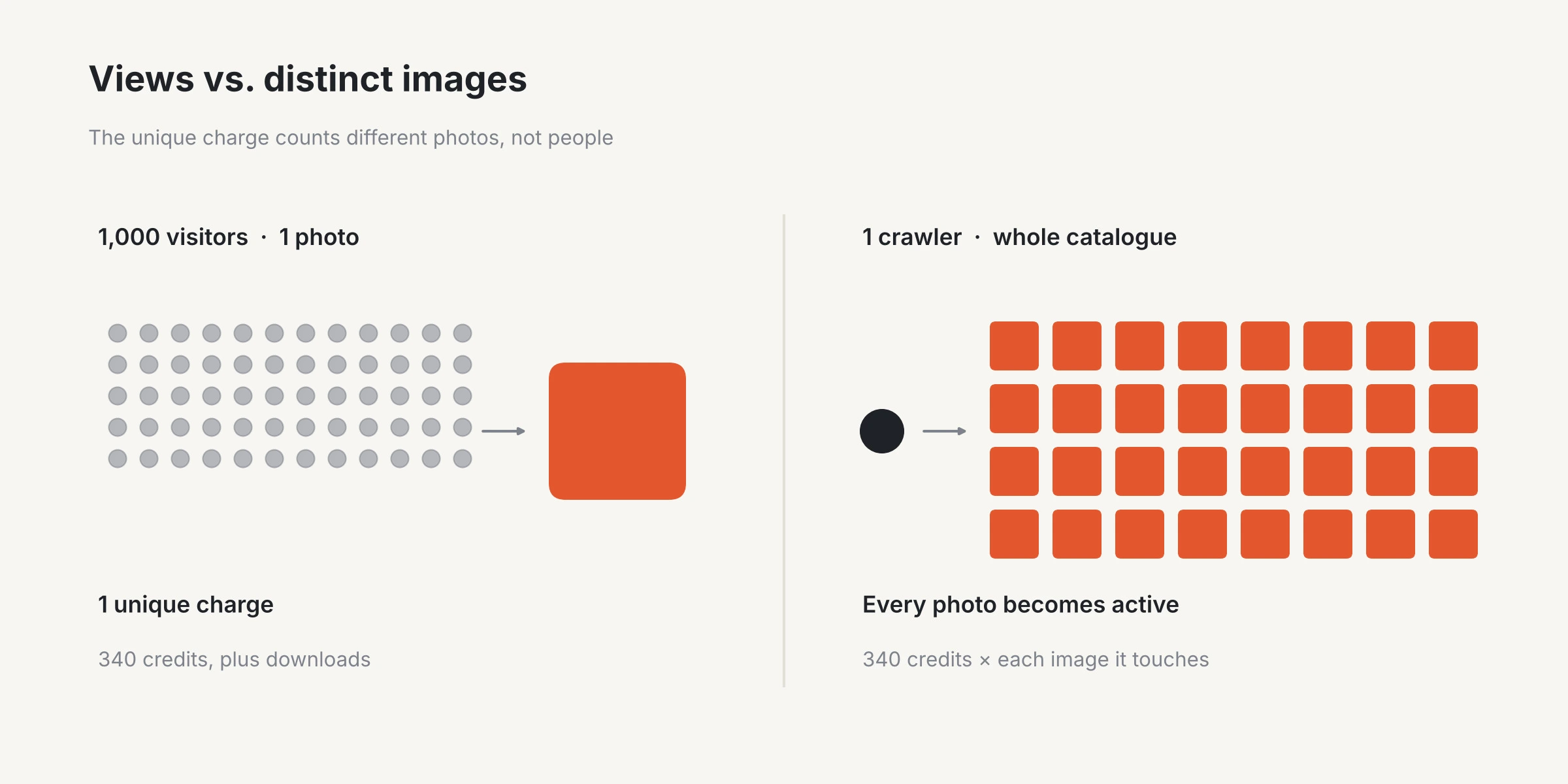
The unique charge tracks how many different images are seen, not how many people see them. A thousand visitors looking at one photo add one unique charge of 340 credits.
The same thousand views still cost about 1,500 credits in downloads, plus transfer, so traffic does show up on the bill, through a different line. In Catalogue B below, downloads and transfer make up 5M of its 25.4M image credits.
Now send one crawler through your sitemap. In a single visit, it can open every listing and touch every photo, making your whole catalogue active for the month. Two marketplaces with identical traffic can get very different bills, and the one with the deeper, more crawlable catalogue pays more.
Four assumptions that don’t hold
Most founders we talk to start with at least one of these in mind. Each one leads to fixing the wrong thing.
What people assume | How it actually works |
|---|---|
Photo size only affects page speed | Size doesn’t change the 340-credit unique charge, but image upload credits are billed by the GB. A 10 MB phone photo costs about 2,170 credits to upload, more than six times its unique charge. A 1 MB photo costs about 245. |
More visitors means a much bigger image bill | Traffic grows downloads (1.5 credits per request) and transfer. The unique charge, usually the largest, grows with how many different images are seen, not with views. |
Old listings nobody visits still cost money | An image no one requests in a month costs nothing |
Only real buyers count | Crawlers, the server render, and your own Console browsing all make images active |
So each charge has its own lever: fewer different photos requested each month cuts the unique charge. Lazy-loading images and fewer crawler visits also cut downloads, while resizing photos before they’re uploaded cuts image upload credits.
What do Sharetribe images cost in dollars?
Images can be the bulk of your credits and still save you less than you’d expect when they go. Two catalogues show it. The figures are usage fees only; the plan fee doesn’t change.
Catalogue A | Catalogue B | |
|---|---|---|
Images seen in a month | 20,000 | 60,000 |
Image credits | 7.6M | 25.4M |
All other usage | 3M | 5M |
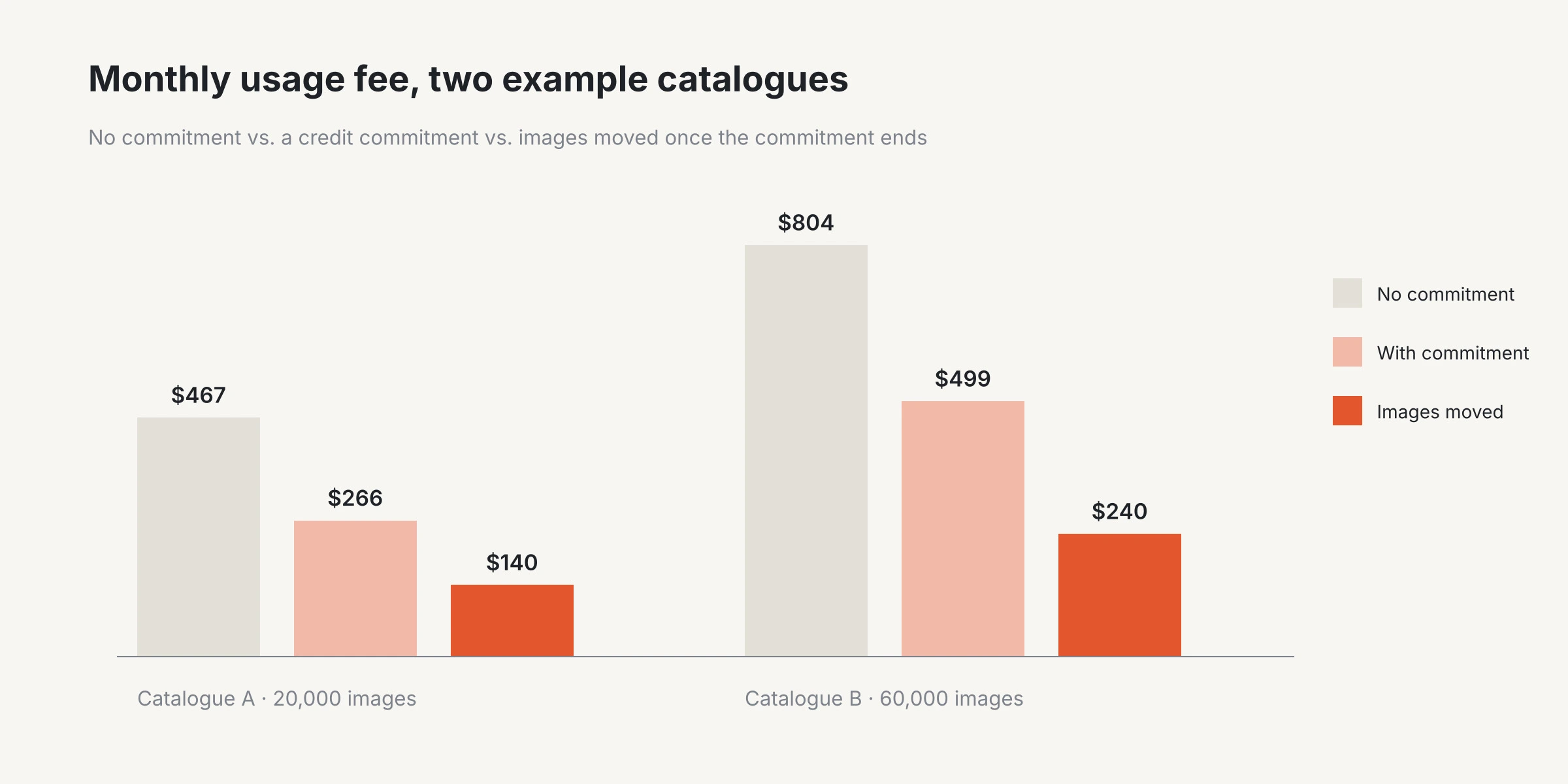
Usage fee, no commitment | $467 | $804 |
Usage fee with a credit commitment | $266 (10M) | $499 (50M) |
Images moved, commitment still running | $249 | $499 |
Images moved, no commitment | $140 | $240 |
Saving from the commitment | $201 | $305 |
Extra saving from moving images while the commitment runs | $17 | $0 |
Extra saving from moving images once the commitment ends | $126 | $259 |
Image credits include the unique charge plus downloads and transfer. We assumed 300,000 requests and 30 GB for A, and 2 million requests and 200 GB for B. Savings from moving images are before about $20 a month for R2 and the image server.
Without images, both catalogues use too few credits for a commitment to pay, so once the commitment year ends, they go back to no commitment. Prices use Sharetribe’s usage tiers and credit commitments.
A credit commitment: no code, but a 12-month minimum
A credit commitment needs no code. You pay a fixed monthly fee for a block of credits: 10M a month for $249, 50M for $499, or 200M for $999.
Sharetribe credit commitments are bought on the Live plan, and Console’s subscription page has a simulator that shows whether one suits your usage. For both catalogues above, a commitment cuts the bill by $200 to $300 a month.
The fee is a minimum payment, not a forecast. A commitment runs for 12 months, and you can’t cancel or downgrade to a smaller one during that time.
If your usage drops, you still pay the full fee. That’s exactly what happens when images move: Catalogue A keeps paying $249 a month instead of $140, and Catalogue B $499 instead of $240, until the commitment year ends.
So if a migration is likely within the next 12 months, decide on it before you commit. Moving images first and then choosing a commitment, or none, for what’s left is often cheaper than committing now and migrating later. If a migration is unlikely, the commitment is the easiest saving available.
Why the savings look smaller than the image share
The volume discounts Sharetribe applies work like a bulk discount: $0.07 per 1,000 credits from 1M to 3M, falling step by step to $0.01 between 20M and 30M. Your last credits are your cheapest ones, and those are exactly the ones a migration removes.
That’s why the maths surprises people. In Catalogue A, images are about 72% of all credits, yet removing them cuts the committed usage fee by about 47% once the commitment ends. In Catalogue B, images are about 84% of credits, and the fee drops by about 52%.
That is also the fair way to judge a migration: only on what it saves beyond the commitment, counted from the month the commitment ends.
Which free fixes should you do first?
Before you move a single photo, do the free fixes. They’re the Sharetribe image optimization steps that reduce Sharetribe usage credits by targeting the requests that make images active. What you need to do depends on whether your marketplace runs custom code.
No custom code: you already have most of these
Sharetribe shipped lazy loading, fewer images in the first page load, and a robots.txt change to hosted (no-code) marketplaces on November 16, 2026. The one step left for you to reduce Sharetribe usage credits further is the image limit: set a maximum number of images per listing type in Console.
Two details matter. The limit is enforced in the marketplace’s listing form, not in the API, so anything that creates listings through the API can still go over it. And listings already over the limit keep their photos.
Custom code: merge these pull requests
If your marketplace runs its own copy of Sharetribe’s Web Template, the same fixes come as small pull requests your developer merges.
Fix | What it changes | Pull request |
|---|---|---|
Cap images per listing | Limits how many photos a listing can hold | |
Lazy-load images | Loads images only near the viewport: listing carousel, gallery thumbnails, cards, CMS pages | |
Two images in the server render | Puts only two images in the server-rendered listing page | |
Block AI training crawlers | Updates robots.txt so AI training bots skip the site. Also check what your sitemap exposes. |
For everyone: smaller uploads
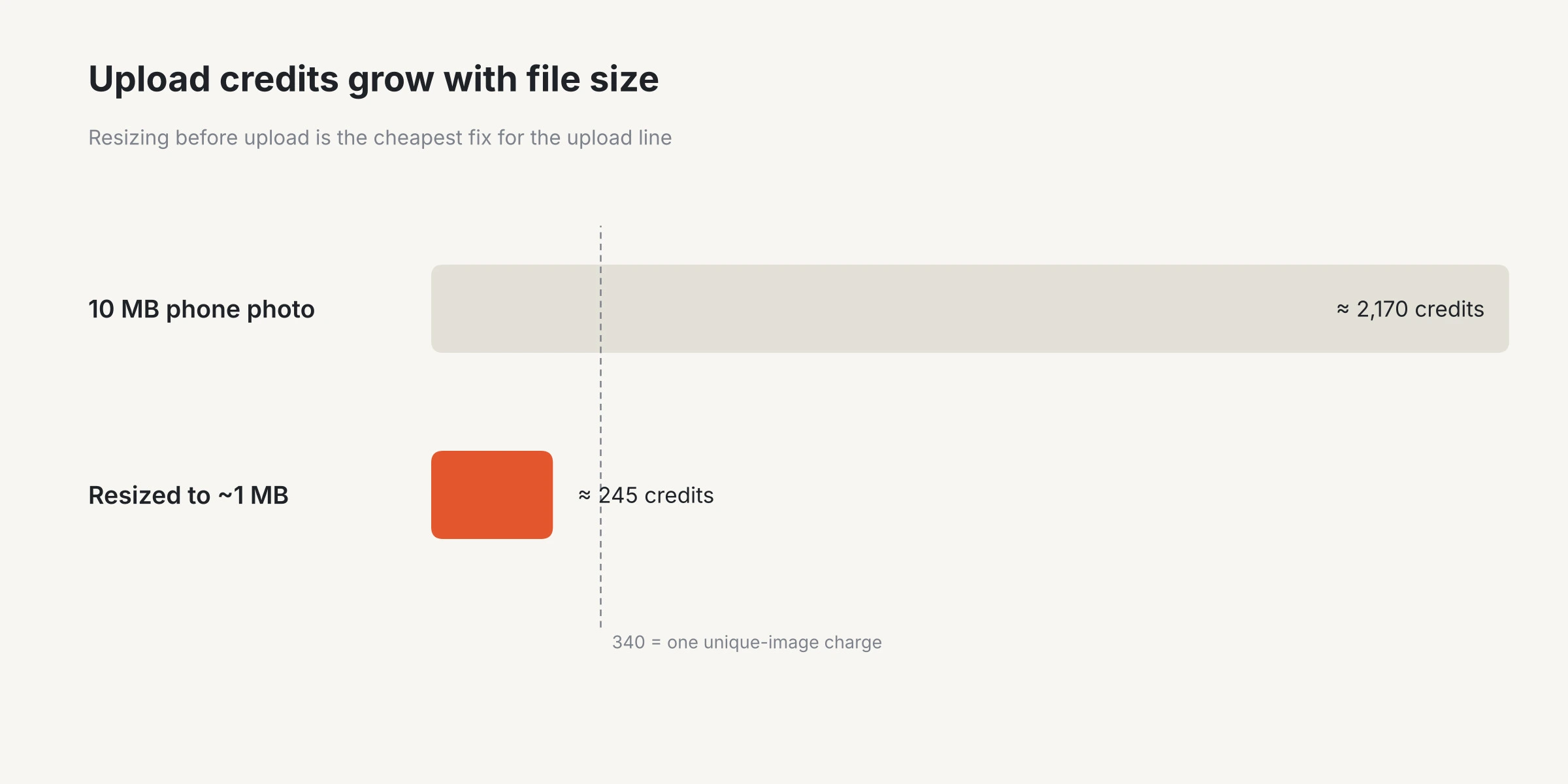
Image upload credits grow with file size. A 10 MB photo straight from a phone costs about 2,170 credits to upload; the same photo resized to around 1 MB costs about 245.
Ask sellers to resize photos before they upload them. On a custom-code marketplace, the template can also resize photos in the browser before upload, which is a small change.
Other files are billed by size as well, so the same habit applies to file uploads in marketplace platforms, such as PDFs and documents attached to listings or transactions.
Why a few small fixes can move a big bill
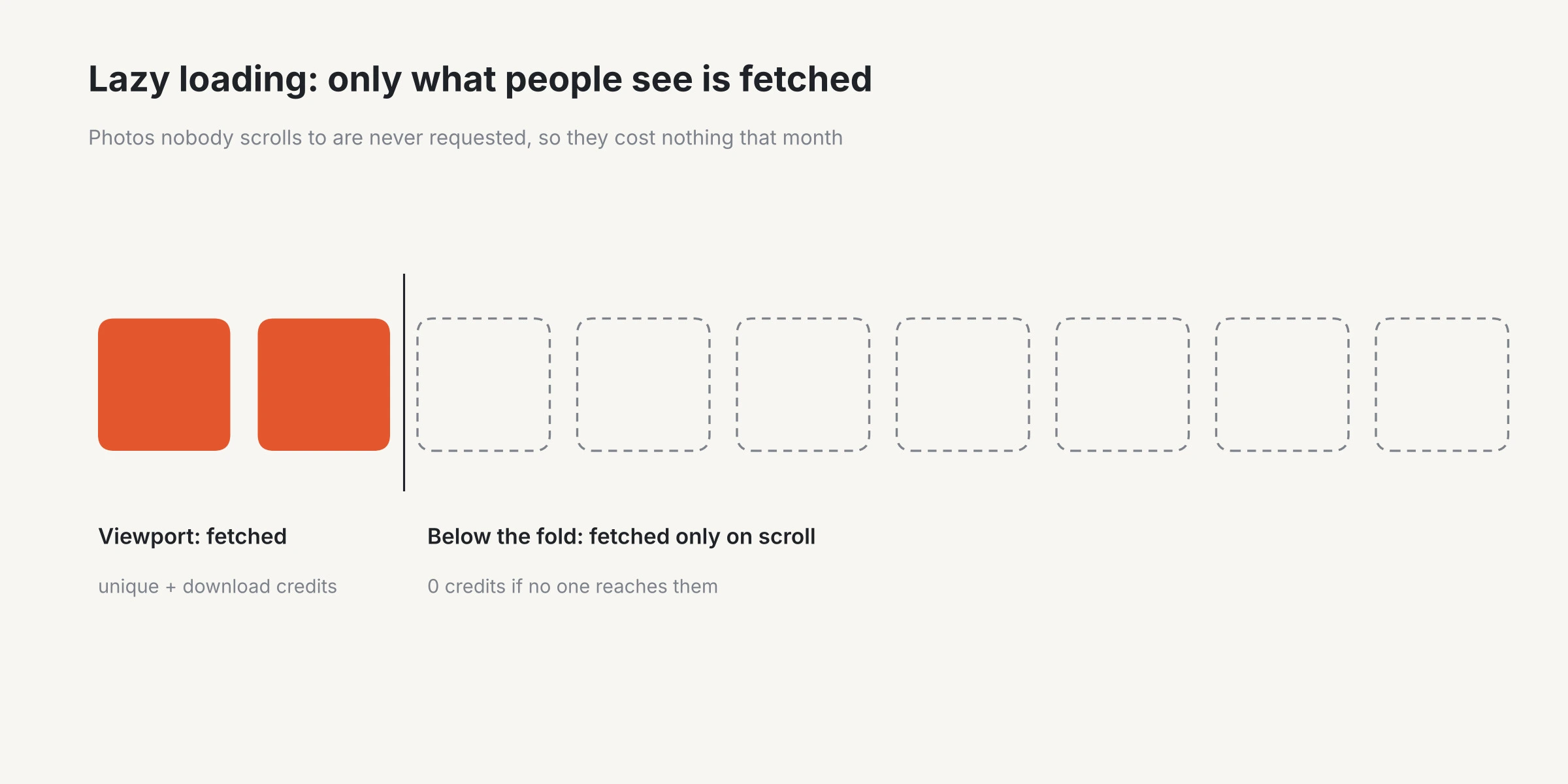
Each fix cuts the number of distinct images requested in a month. With lazy-loading images, a photo at the bottom of a gallery is only fetched if someone scrolls to it. The server-render change matters most for crawlers: many crawlers fetch every image URL in the HTML they visit.
Try this five-minute test on a custom-code marketplace: open a listing page with JavaScript turned off and count the image URLs in the HTML. If you see the whole gallery, your fork predates PR #955, and crawler visits can make every photo active.
One habit counts too. Browsing listings in Console makes their images active, so a team that reviews every listing there adds to the bill.
What if your template is an older fork?
If your template was forked a while ago, these changes have to be merged by hand, and your custom code may conflict with them. It’s still the cheapest saving available, but it’s real development work for someone who knows the template well.
If you don’t have that person in-house, our guide to finding a qualified Sharetribe partner explains what to check before you hire. Once you’ve chosen someone, our notes on how to onboard dedicated dev team members help them get productive in your fork faster.
Measure, then decide
After the fixes, export your usage CSV from Console under Usage details and compare the image lines with the month before. The CSV lists credits per endpoint, so it’s the quickest view of your Sharetribe API credit usage.
Whatever Sharetribe image cost is left is what a migration could remove. If that line is small next to your commitment, a migration won’t pay back, and the fixes have already done the job.
What does moving images to Cloudflare R2 involve?
Only the image files leave. Listing photos and profile pictures move to a Cloudflare R2 storage bucket you own, while users, listings, transactions, payments, and the Console stay on Sharetribe. The move needs custom code, so it’s only an option for marketplaces that run their own copy of the Web Template, not for hosted no-code ones.
What it costs to run
Each photo is stored once in R2, and the sizes your pages need are made on demand by a small image server. R2 pricing is $0.015 per GB a month with the first 10 GB free and no egress fees, so 60,000 photos at 2 MB each cost under $2 a month to store. With the image server, expect about $20 a month in total.
If you’d rather not run a server, Cloudflare’s image transformations can do the resizing instead. They’re billed much like Sharetribe’s unique-image charge: 5,000 unique transformations a month are included, then $0.50 per 1,000. For Catalogue B in four sizes, that’s about $117 a month, so check Cloudflare Images pricing against your own catalogue before choosing it.
What the work involves
A migration has four main parts. New photos get a new upload path that lands them in R2, and each listing’s photo references are stored in its metadata, written by your server so nobody can point their listing at someone else’s photos.
Every screen that shows a photo is switched to the new source. A one-off script then copies existing photos to R2, with Sharetribe’s images kept as a fallback until every listing is checked.
Sharetribe doesn’t give access to the original uploads, so copied photos come from the largest size the Sharetribe CDN serves, up to 3072 px. The copy itself makes every image active for that month, so it’s best run late in a month, when most images have been charged anyway.
What breaks if it’s done badly
Photos appear in more places than most quotes allow for: search cards and the map, the listing gallery, checkout, the inbox and transaction pages, the seller’s own listings, social sharing previews, and avatars, including those of users who joined through your social sign-in setup for Sharetribe. Miss one, and buyers see a blank photo at checkout, or a seller shares a listing with an empty preview.
Two safeguards matter as well. The image server should only produce sizes it has approved; otherwise, anyone with a script can request endless sizes and run up your server and storage costs.
Uploads must also check that the person is signed in to your marketplace. When you compare quotes, ask how each one handles these.
What do you give up by moving images off Sharetribe?
None of these is a blocker, but each one needs an owner.
- Console won’t show the new photos. If your team reviews listings in Console, you’ll need a small review page of your own.
- Anything else that reads listing images needs the same change. That includes Integration API scripts, email templates, product feeds, a mobile app, and AI tools that pull listing data, such as AI fetching in marketplaces.
- Branding is an open question. The logo, favicon, and Pages images come through the Asset Delivery API, and Sharetribe’s docs don’t say whether they count as unique images. Check your usage report before touching them.
- Modern formats are extra work on a self-hosted image server. A basic server delivers JPEG and PNG; adding WebP or AVIF conversion takes more work.
What you keep by staying on Sharetribe
This changes one cost line, not your platform. Users, listings, search, transactions, payments through whichever of the Sharetribe payment gateway options you use, and the admin Console stay where they are, with the hosting, security, and updates Sharetribe already runs for you.
That managed setup is a big part of what users say about Sharetribe, and it’s why we suggest an images-only move rather than a rebuild.
When does moving images to R2 pay back?
Under Sharetribe usage pricing, a migration pays back when its one-time price, divided by the monthly savings beyond your best commitment, gives a number of months you’re comfortable with.
A simple payback rule
Take the extra saving from moving images, subtract about $20 a month for R2 and the image server, and divide the migration price by the result. That gives payback in months.
If you already have a credit commitment, start counting from the month it ends. Until then, the migration saves little or nothing: Catalogue A saves $17 a month against $20 in running costs, and Catalogue B saves nothing.
Add the months left on your commitment to the payback period.
Once the commitment ends, A nets roughly $106 a month and B roughly $239. The same fixed price pays back more than twice as fast for B, because it has three times the photos.
If payback, counted from the end of your commitment, runs past 12 months, don’t migrate: the free fixes and a commitment are the better way to cut Sharetribe infrastructure costs. Run the numbers again after the free fixes, since they often shrink the image line enough to settle the question.
Why the answer changes as you grow
The image line grows with every new seller and every new listing. A marketplace comfortably below the line today can cross it within a year, and the first sign is usually the invoice. If you’re about to launch an online multi-seller marketplace, plan for this line from day one.
That’s worth revisiting as part of post-launch growth for Sharetribe marketplaces. Re-export the usage CSV every quarter, and again before a commitment renews, to see which way it’s moving.
How do you start cutting your Sharetribe image bill?
Start with your usage CSV. If you’ve done the free fixes and images still dominate the bill, our Sharetribe expert team can move your images to R2 as a one-time, fixed-price service. Everything else stays on Sharetribe, and the marketplace stays live throughout.
Item | Details |
|---|---|
What moves | Listing photos and profile pictures |
Where it runs | Your own Cloudflare account; you own the storage and the code |
Price | Fixed, set after reviewing your usage and your template, and it doesn’t change after that |
Quoted separately | A listing review page, changes to emails, feeds, mobile apps or other scripts, branding images, and WebP or AVIF conversion |
The first step is free: export your usage CSV from Console under Usage details and send it to us. Within 2-3 days, we’ll tell you which applies: the free fixes are enough, images are worth moving, or something else is driving the bill.
Sharetribe names Integration API event polling as the other usual cause, which can come from integrations that check for new transactions, such as a shipping API integration, so we check for that too. No call needed, and the answer is yours to use with any developer.
Want an honest answer on your Sharetribe bill?
Send us your Console usage CSV. In 2–3 days, we’ll tell you whether free optimizations will fix it or if moving images to R2 pays back—no sales call required.
Analyze My Usage CSVFAQ

Recommended articles
 Shipping Integration for Sharetribe Marketplaces: Shippo and Beyond
Flat rates break down as your catalog grows. This guide covers shipping API integration for Sharetribe – what it adds, how it's built, and what a project actually looks like.
 AI App Security Checklist for Founders: From Working Demo to Safe Product
AI startup security best practices for founders: ownership lists, payment tests, package checks, backup restore proof, and the six demonstrations to ask your developer for.
 Sharetribe Design: How to Turn a Template Marketplace into a Branded Product
A default Sharetribe marketplace looks clean but generic. This guide breaks down exactly what you can customize without code, when to hire a Sharetribe marketplace designer, and how real founders turned templates into branded products. Includes case studies.
 Sharetribe Customization: How Far Can You Really Go?
Every Sharetribe founder asks the same question: can I customize it? The real question is which layer: Console, Extend, or full custom development. Our guide breaks down exactly what you can build at each level
