What are the biggest vibe coding security risks?
Is AI building your product, or running inside it?
How can I check the security of my Vibe-Coded website?
Supabase Row Level Security explained for founders
How do I secure an app built with Lovable, Cursor, or Claude Code?
How to protect user data in an AI-built app
How should a marketplace handle payments securely?
Can I trust the packages the AI installed?
Can a vibe code website checker tell me my app is safe?
What does AI code review for non-technical founders actually involve?
What if the product itself uses an LLM or agent?
What goes on an AI app security checklist for founders?
What do AI startup security best practices look like on a bad day?
Subscribe and you will promptly receive new published articles from the blog by mail
A working demo tells you almost nothing about security: a 2026 scan of 1,072 AI-built apps on Supabase found at least one flaw in 98% of them. This founder’s guide to AI security covers what you can check yourself, what should stop a launch, and what proof to ask your developer for. You don’t need to read the code, but you do need to see test results.
This guide is for founders and specialists who built a product with GitHub Copilot, Claude Code, Cursor, or another AI tool and can’t audit every line themselves. Our take on vibe coding for marketplaces covers the wider picture, so here we stick to security.
If you want the developer-facing version of this conversation, Roobykon Software has an article about How to Secure AI-Generated Code in 2026: An Engineering Playbook, covering CI gates, authorization boundaries, and supply-chain controls.
- Security for vibe coding starts with one question: did AI only build the product, or does it also run inside it? The checks differ.
- The most common vibe coding security vulnerabilities are missing database access rules, secrets exposed in code or chat, and payment events accepted without proof.
- AI startup security best practices include a one-page system map, verified account ownership, a two-user access test, and a dated backup restore.
- For non-technical founders, AI code review means asking for demonstrations, not reading code. Ask to see a changed price ignored, a tampered payment message rejected, and a duplicate event producing one action.
- If you can't produce an ownership list, a two-user test, a payment test, and a restore record, commission an independent review before real users or money arrive.
Is my AI-built app secure?
Probably not yet, and the screens won’t tell you either way. AI marketplace tools are great at making an app look finished. They’re much less reliable at the unglamorous parts that protect users: who may see which record, where secret keys live, and what happens when someone sends a request your interface never offers.
Symbiotic Security’s 2026 scan gives a useful reality check. It found at least one issue in 1,046 of 1,072 AI-built apps using Supabase, 173 of them had a critical one, and only 26 came back clean. That’s a selected sample tested by a scanner, so don’t read it as “98% of all AI-built products are vulnerable.” Read it as a reminder that “the app works” and “the app protects its users” are different claims.
Most vibe coding security vulnerabilities in that study weren’t clever exploits. In 172 apps, anyone could delete records without logging in.
What do real incidents look like?
Wiz researchers found that a missing database access rule at Moltbook exposed 1.5 million authentication tokens, tens of thousands of email addresses and private messages. Nobody needed to break in.
The Lovable case looks different. Lovable says a backend regression let other signed-in users with a project link see the chat history and source code of public projects between February 3 and April 20, 2026. Its incident report says private projects and Lovable Cloud weren’t affected.
None of this is an argument against using AI. It’s an argument for asking four plain questions before launch. Who may see the data? Who may move the money? Where do the secrets live? How do we recover when something breaks?
What are the biggest vibe coding security risks?
Eight vibe coding security risks come up again and again, and any one of them is a reason to stop adding features. They aren’t backlog items. Each one can do real damage the day you launch.
Warning sign | What can go wrong | First action | How you know it’s fixed |
|---|---|---|---|
A live secret sits in code, an AI chat, a log or a public repository | Account takeover, data theft, fraudulent charges | Revoke and replace it now, then look for misuse | The provider shows the old key as disabled |
An admin action is protected only by hiding its button | Unauthorized refunds, exports or account changes | Switch the action off until the server checks permissions | A normal test user is refused, even when calling the action directly |
Changing a record ID shows someone else’s data | One customer can read or edit another’s records | Disable the feature until ownership checks exist | Two test accounts each see only their own records |
The app accepts payment notifications without proving where they came from | Fake payments or refunds | Pause the automation and add signature checks | A tampered test event fails and an official one passes |
Price, commission, payout or trust status comes from the browser | Price manipulation, privilege bypass | Recalculate and authorize on a trusted server | Browser input can’t override the server’s answer |
The production database or a storage bucket is public | Bulk data exposure | Restrict access and review the logs | Outside access fails while the app keeps working |
Nobody has restored a backup successfully | Permanent data loss or a long outage | Do a controlled restore away from production | A dated restore record with a result and an owner |
An AI agent can send money, delete data or change permissions without separate approval | A malicious instruction becomes a major incident | Remove the action, or add a separate rule and human approval | The team shows that an unapproved action is denied |
If a secret has leaked, deleting the line or rewriting Git history isn’t the fix, because someone may already have copied it. Replace the credential first and investigate afterwards. GitHub’s secret-scanning guidance says the same.
Is AI building your product, or running inside it?
Those are two different situations, and security for vibe coding starts with knowing which one you’re in.
AI helped build the product. Cursor, Claude Code or another tool wrote some of the code, but no model runs after launch. Focus on access to user data, passwords and keys, payments, third-party packages, monitoring and backups.
AI runs inside the product. A chatbot, recommendation engine or agent reads user data or takes actions on its own. You need every check above, plus limits on what the model can read, do and spend. If you’re still weighing where AI belongs in your product at all, our overview of AI integration in marketplaces is a good place to start.
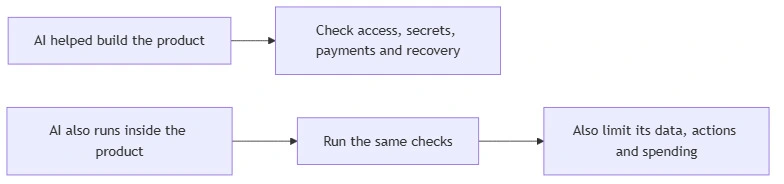
Security professionals use the OWASP Top 10:2025 for ordinary web risks and the OWASP Top 10 for LLM and GenAI Applications 2025 when a model runs inside the product. You don’t have to learn either list. You need a reviewer who can turn them into tests and show you the results.
How can I check the security of my Vibe-Coded website?
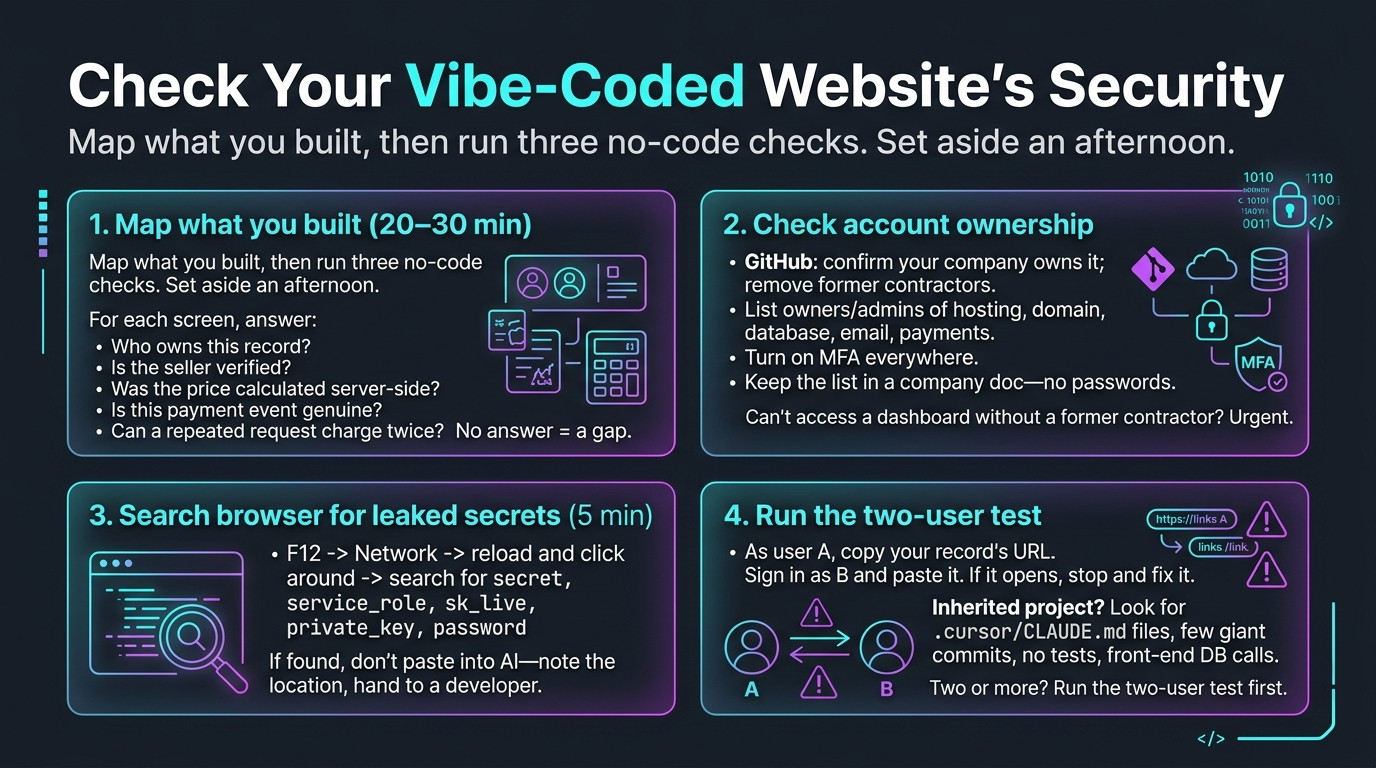
Start with a one-page map of what you built, then run three checks that need no code: account ownership, a search for leaked keys in the browser, and a two-user test. Set aside an afternoon. You’ll finish with a list of gaps and a much better brief for any specialist you bring in.
Map what you actually built
Security work tends to protect what’s visible and miss what’s valuable. Twenty to thirty minutes with a blank page fixes that. A single screen can hide several separate trust decisions: who owns this record, is the seller verified, was the price calculated on the server, is this payment event genuine, will a repeated request charge twice? If a row below has no answer, or nobody can name the owner, that’s a gap to close before real users or investors arrive.
Question | Example answer | What you should see |
|---|---|---|
Where is the source code? | A private GitHub repository | You control the organization and can see every member |
Where does the live product run? | Vercel, Render, AWS or another provider | You can name the account owner and every administrator |
What private data is stored? | Emails, addresses, messages, identity documents | A plain-language list of the data and how long you keep it |
What can move money? | Checkout, refunds, payouts, commission changes | A list of those actions and who may perform each one |
Who has powerful access? | Founder, support lead, developer, deployment service | A current access list, MFA status, and a process for removing people |
Which other companies receive data? | Stripe, Sharetribe, analytics, CRM, email, an AI provider | A list of integrations and the data each one gets |
Does AI run inside the live product? | A support bot or recommendation agent | A list of the data it reads and the actions it can take |
Can the product be restored? | “The database is backed up” | A dated record showing that a restore actually worked |
If nobody can say who controls the domain, database, payment account, repository, and production environment, you already have a vibe-coded app security problem, whatever the code looks like. On Sharetribe? We cover hosting options for a Sharetribe marketplace separately.
Check account ownership yourself
You don’t need to read any code for this one.
- Open the GitHub organization or repository and go to Settings, then Collaborators and teams. Confirm your company owns the account and that former contractors are gone.
- Open the dashboards for hosting, domain, database, email, and payments. Write down the owner and every administrator.
- Turn on multi-factor authentication wherever the provider offers it. That’s the extra login step that asks for an app code or a security key.
- Keep the list in a company-controlled document, without passwords or secret keys.
If you can’t get into one of these dashboards without asking a former contractor, treat that as urgent vibe coding security vulnerabilities.
How to check for vibe coding in a project you inherited
Look for traces of AI marketplace tooling, and treat what you find as a hint, not proof. Nobody can detect AI-written code with certainty, and you don’t need to. You only need to know which checks to run first.
- Tool files in the repository, such as a .cursor folder, CLAUDE.md, AGENTS.md or a lovable-tagger dependency.
- A commit history made of a few giant commits with generic messages.
- Little or no automated testing.
- The same logic copied into several places under slightly different names.
- Database or payment calls made straight from front-end code.
If two or three of these show up, run the two-user test below before anything else.
Search the browser for leaked secrets
This is a warning check, not a full AI app security checklist for founders test, and it takes about five minutes.
- Open the live app in Chrome or Edge.
- Press F12 on Windows or Command + Option + I on macOS to open Developer Tools.
- Choose Network, reload the page, and click through a few ordinary screens without entering real personal data.
- Use the search box to look for secret, service_role, sk_live, private_key, and password.
- If something turns up, don’t paste it into an AI chat. Note where it appeared with the value hidden and hand it to a developer.
Some browser-visible values are meant to be public, like Stripe keys starting with pk_ and Supabase publishable or anon keys. Stripe sk_live keys, Supabase service_role keys, private keys, and passwords must never reach the browser.
Run the two-user test
Create two ordinary accounts. Signed in as user A, open one of your own records and copy its address. Sign in as user B and paste it in. Then sign out and try again. If the record opens in either case, stop and fix it before anything else, because that’s exactly how one customer ends up reading another customer’s data.
Supabase Row Level Security explained for founders
Row Level Security, or RLS, is a set of database rules that stops one user from seeing or changing another user’s records. Supabase security for founders mostly comes down to two questions: does every table have those rules, and do they say what you think they say?
The public key you can see in browser code isn’t a leak by itself, because it’s meant to be public. The danger is a table with missing or overly broad rules, which is what exposed Moltbook’s data. In Symbiotic’s scan, 39 apps had tables that anyone holding that public key could read in full.
The key that must never reach the browser is service_role, because it bypasses RLS completely. Watch tables added later, too. A rule written for the first table often doesn’t get copied to the fifth.
Ask your developer to show, in a test environment, that user A can’t read, edit, or delete user B’s records, even while signed out. If they can’t, stop collecting sensitive data until the rules are reviewed. The official Supabase RLS guide explains the mechanics.
How do I secure an app built with Lovable, Cursor, or Claude Code?
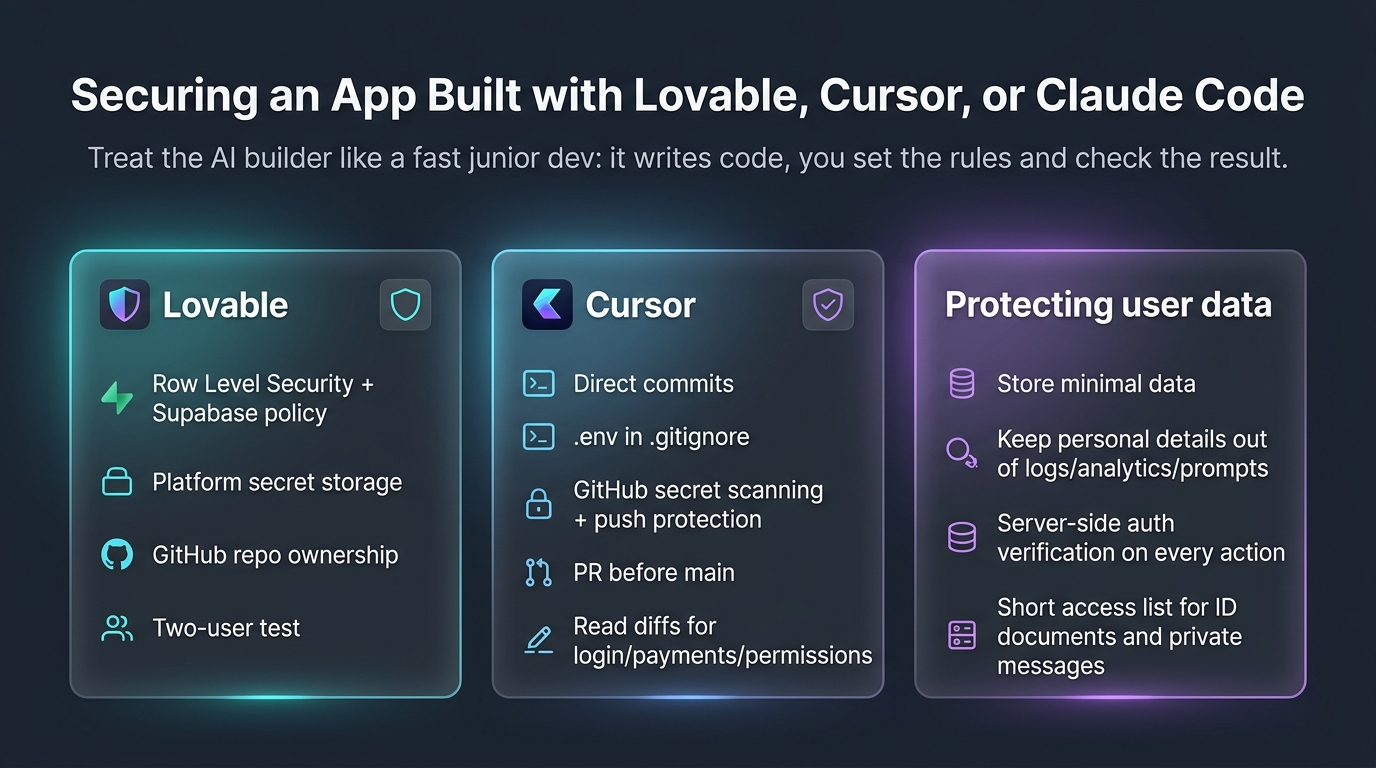
Treat the AI builder like a fast junior developer. It writes the code, and you set the rules and check the result. The details differ a little by tool, so here are two of the most popular.
How to secure a Lovable app
Start with the database. The critical findings Symbiotic describes were about missing access rules on Supabase-backed apps, and Lovable is one of the tools in that scan. Check that every table has Row Level Security and a policy matching who should see what. Keep third-party keys in the platform’s secret storage, never in a prompt, a chat or front-end code.
Connect the project to a GitHub repository you own, so the code and its history don’t live only inside one tool. Check whether your project is public, since the 2026 incident described above affected public projects and not private ones. Then repeat the two-user test after every major feature.
How to secure a Cursor built app
Cursor writes code straight into your repository. That’s great for review, and it also makes you responsible for what gets committed. Nothing stops an agent from adding a .env file or installing a package it made up. Add .env to .gitignore before the first commit, turn on GitHub secret scanning with push protection, and require a pull request before anything reaches the main branch.
Read the diff of every AI change that touches login, payments, or permissions. Use separate test and live credentials. And never paste production keys into the chat, however convenient it feels.
How to protect user data in an AI-built app
Know what you store, keep it out of places it doesn’t belong, and make the server check ownership on every request. That covers most of the ground.
The data map you drew earlier is your starting list. Delete what you don’t need, since data you never stored can’t leak. Keep personal details out of logs, analytics events, and AI prompts unless someone decided they should be there.
Then check the server side. For every important action, whether it’s a profile change, an upload, a refund, or an export, the server should verify who’s signed in, which record is affected, who owns it, and whether the action is allowed right now. Hiding a button on a screen does none of that. Before anything else, verify that ownership is enforced on the server – that is the starting point for answering is my AI-built app secure.
If you collect identity documents or private messages, treat them as the most valuable thing you hold: a short access list, a defined retention period, and a restore test.
How should a marketplace handle payments securely?
Treat everything the browser sends as a request, never as an authority. The browser is under the customer’s control, so a user can change what it sends even when the screen offers no such option.

Your server has to identify the user, load the real listing, calculate the price again and decide whether the action is allowed. Sharetribe calls its sensitive server-only actions privileged transitions. The name matters less than the rule: the secret that authorizes them stays on the server, and your custom code still checks prices, commissions, refunds and eligibility.
Stripe sends payment events to your server as a webhook. Your server must verify Stripe’s signature, which proves the message really came from Stripe, and recognize repeated deliveries so one event can’t trigger two refunds or payouts. Stripe documents the check in its webhook signature guide.
Ask to see three payment tests
Ask your developer to demonstrate three cases: a changed price is ignored, a tampered Stripe message is rejected, and the same valid event sent twice produces one business action. You don’t need to read the implementation. You need to see the expected result and a saved automated test. For a deeper look at where platform code ends and custom code begins, read our guide to Sharetribe marketplace security.
Can I trust the packages the AI installed?
Not until someone checks. AI marketplace tools sometimes invent convincing package names, and an attacker can register one of those names and fill it with malicious code. The risk has a name: slopsquatting.
Research covering 16 code-generating models found that at least 5.2% of package suggestions from commercial models and 21.7% from open-source models did not exist in the tested prompts and configurations.
You don’t need to audit package code yourself. Ask the developer to show that every new package exists in the official registry, has a real publisher and history, is pinned in the lockfile and passed a dependency review. Most of the time the name will be real. The check exists for the times it isn’t, and “the AI suggested it” isn’t evidence.
Can a vibe code website checker tell me my app is safe?
No. A scanner reports what it recognizes, and a clean result only means it found nothing it knows how to look for. That’s a useful signal, and it isn’t a certificate.
People often ask how to check vibe code for security app after app without hiring a full team. The practical answer is layers, where each one covers gaps the last one leaves. Here’s what each layer can and can’t do.
Check | What it can help find | What it often misses |
|---|---|---|
Credential scanner | Recognized passwords, tokens, and keys in the repository | Unusual formats, values pasted into chats, secrets stored elsewhere |
Code scanner | Known unsafe patterns in supported languages | Who should be allowed to refund, export or edit a record |
Package scanner | Published warnings for known package versions | A brand-new malicious package with no warning yet |
Running-app scanner | Problems visible from outside the live app | Complex roles and dangerous payment edge cases |
AI review | Extra suggestions and suspicious patterns | Both missed issues and warnings that aren’t real |
Experienced human review | Access boundaries, business rules, combinations of small problems | Anything left out of scope or changed afterwards |
Penetration test | Whether the agreed attacks work at that point in time | Future releases and anything outside the agreed scope |
Use several layers, and put a person who understands your business rules on top of them. A tool can’t know who’s supposed to be allowed to issue a refund.
What does AI code review for non-technical founders actually involve?
An AI code reviewer is a quick second opinion. It can miss real problems and flag ones that don’t exist, so it shouldn’t be the last word. You may not be able to judge every finding, but you can ask for demonstrations instead of reassurance.
AI reviewers are decent at spotting common vibe coding security risks, like a hard-coded key or an unsafe query. They’re weak on business rules, like who may approve a payout. That’s why the list below is about proof, whether your product was built by a freelancer, an agency, a technical co-founder, or an AI platform.
Ask for | A useful answer looks like | Red flag |
|---|---|---|
A one-page system map | Users, website, server, database, payment provider and other services | “It’s a standard setup” |
A list of roles and permissions | What visitors, customers, sellers, support staff and admins may do | Permissions described only as visible buttons |
Security test results | Date, what was tested, findings, fixes, and open issues | A “0 issues” screenshot with no explanation |
A software package list | Names, exact versions, sources, and known warnings | “The AI chose the packages” |
A plan for secrets | Secrets kept outside the code, with documented access and replacement steps | A .env file in GitHub or keys shared in chat |
Payment tests | Fake, modified, repeated, failed, and successful payment messages | Only a successful checkout demo |
Backup and restore proof | A dated restore test with an owner and open gaps | “The cloud provider has backups” |
An issue list | Business impact, proof, owner, status and accepted risks | The code author closes warnings without explanation |
An emergency procedure | Contacts, ways to stop damage, useful logs, recovery and communication | “We’ll debug it if it happens” |
Six demonstrations to ask for
Ask your developer, agency or technical co-founder to show these in a test environment:
- User A tries to read or change user B’s data.
- A customer changes a price sent by the browser, and the server ignores it and uses the correct one.
- The payment provider sends the same event twice.
- A normal user attempts an admin or payout operation.
- A serious security check fails and stops a release.
- A backup is restored in a controlled environment.
The quality of the demo matters. A hidden button isn’t authorization, and a successful checkout says nothing about a forged webhook or a duplicate refund. For more on spotting trouble in a team, see red flags to watch for in your dev team.
What if the product itself uses an LLM or agent?
Then the model is part of your attack surface, and four more questions join the review.
- What private data can enter the model’s context? Minimize it. Select data for the signed-in user and their organization before anything is sent to the model, and check the provider’s current rules for storing and using data, because there’s no universal policy.
- What can the model do? Give it only the actions it needs. Keep permission checks in ordinary application rules that give the same answer every time. A prompt saying “only refund authorized orders” is an instruction, not a lock.
- What needs independent confirmation? Payments, deletion, permission changes, and public posting should pass a separate fixed rule or human approval.
- How is use bounded? Set limits on requests, run time, repeated actions, and spending, and alert someone when usage jumps. Assume users will eventually find your hidden instructions, and never put passwords or secret keys in them.
What goes on an AI app security checklist for founders?
Twelve rows, one status each: Verified, Gap, or Not applicable, with a reason. An undocumented assumption counts as a gap.
Area | Question | What to keep as proof |
|---|---|---|
Ownership | Do we control the code, domain, hosting, database, payments, and email? | Administrator list |
Powerful accounts | Is MFA on, and are former users removed? | Dated access review |
Secret credentials | Are live secrets outside the code, and were exposed ones replaced? | Scan result and provider status |
User data | Can two test users access only their own records? | Saved deny-test result |
Payments | Does the server set amounts, verify provider messages, and ignore duplicates? | Payment test results |
Packages | Did a human verify every new package and its exact version? | Lockfile and package review |
Data map | Do we know what private data is stored and shared? | Data and integration list |
Recovery | Has the team restored a backup successfully? | Dated restore record and owner |
Alerts | Will a named person receive and act on serious alerts? | Alert test and contact path |
Releases | Can a serious failed check stop a release? | Repository and release settings |
Emergency response | Can we stop damage, replace keys, communicate, and restore? | Rehearsed response plan |
AI inside the product | Are the model’s data, actions, approvals, and spending limited? | Denied-action and spending-limit tests |
Run it before your first public release and again before every significant one. The goal isn’t a perfect score. It’s that every critical assumption is written down and has an owner.
Treat it as a snapshot. A product that’s safe at launch can turn unsafe after the next feature, integration, or team change, which is why security for vibe coding is a habit and not a pre-launch task.
What do AI startup security best practices look like on a bad day?
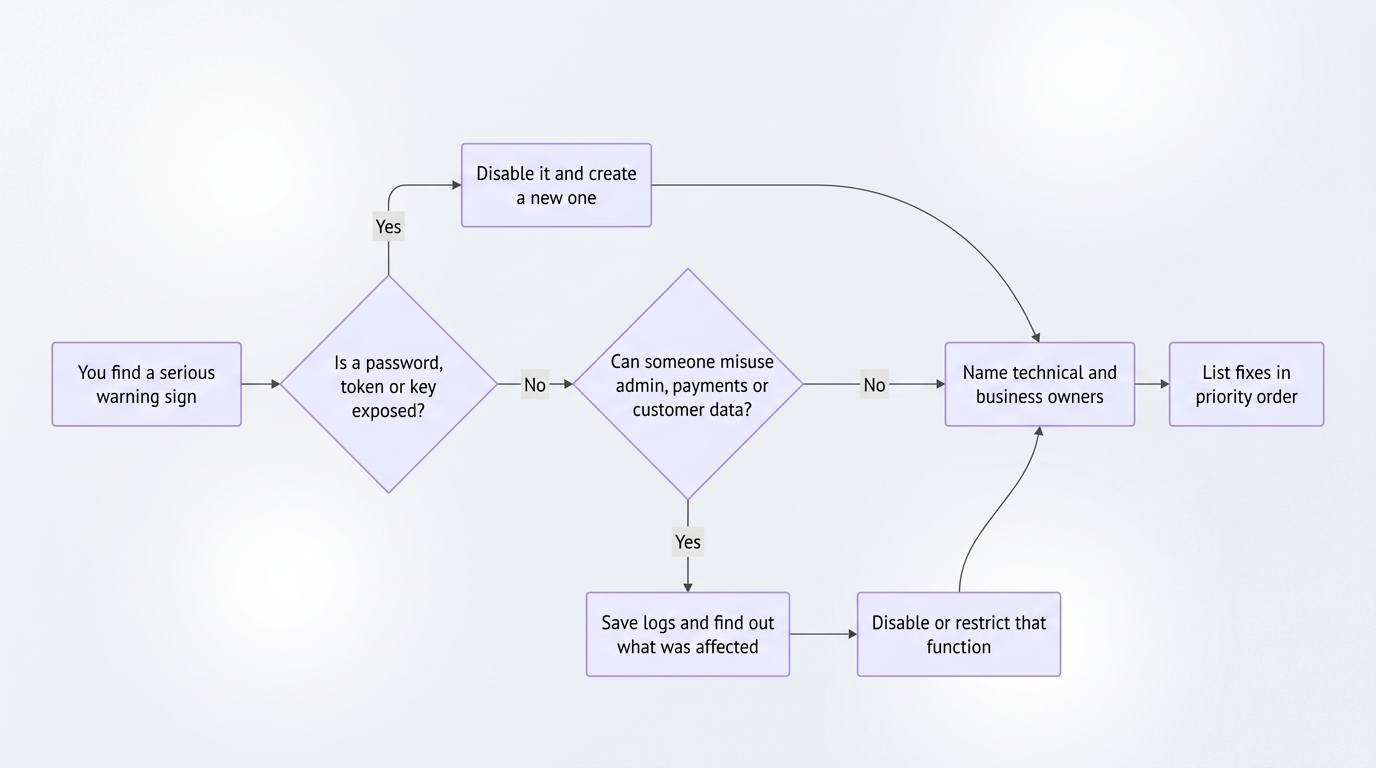
AI startup security best practices look like an order of operations you agreed on before you needed it. If a confirmed critical issue shows up, such as an exposed production credential, unauthorized admin access, or customer data visible to the public, work through the sequence below and match your speed to the exposure. It’s a priority list, not a promise that every product can be fixed in seven days.
In the first 60 minutes
- Find out who administers the live product, code repository, payments, database, domain, and email.
- Confirm multi-factor authentication on the most important accounts.
- Find exposed passwords, tokens, and keys and replace them immediately.
- Switch off unsafe admin, payout, refund, and mass-download functions.
- Save the activity logs before you make broad changes, since they may show what happened.
- Name one person to lead the technical work and one to make business decisions.
In the first 24 hours
Map sign-up, login, password recovery, data changes, checkout, refunds, payouts, admin actions, uploads, and exports. For each important action, have the developer show that the server checks the signed-in user, the record, its owner, and whether the action is allowed.
Run tools that look for leaked credentials, unsafe code patterns, and known problems in third-party packages, and confirm that test and live credentials are separate. Restore a backup outside the live product. Log every issue with its business impact, proof, owner, due date, and status.
In the first week
- Protect the main branch and require review before production changes.
- Add automated tests proving that users can’t reach each other’s data, repeated payment messages don’t duplicate a charge or refund, and modified payment messages are rejected.
- Make serious security-check failures stop a release automatically.
- Review third-party integrations, permissions, and unused credentials.
- Set alerts for authentication failures, privileged actions, payment anomalies, and error spikes.
- Decide who gets called during an incident, and rehearse one example together.
When do you need a vibe-coded app security audit?
In most cases, you need a vibe-coded app security audit before real users or real money arrive, and if your team can’t produce four things: the ownership list, a two-user access test, a payment test, and a restore record. Commission an independent review at that point, not after the first incident.
For a marketplace, the vibe code website review should cover sign-up, listings, messages, checkout, refunds, payouts, admin actions, integrations, and recovery. What you should get back is a prioritized plan: what to stop now, what to fix next, how each fix will be verified, and who owns the remaining risk. Not sure who to hire? Our notes on how founders should evaluate development partners are a good start.
A penetration test can be useful for a mature or high-impact product, but it’s a snapshot, not permanent proof of security. Tests that imitate an attacker should run only against an approved test environment, and an experienced reviewer should look at access rules and business actions like refunds and payouts before each public release.
AI doesn’t create a new kind of code. It speeds up how quickly both useful features and untested assumptions arrive. So, is my AI-built app secure? Whatever you can prove today is the honest answer.
Want to check the security of your vibe-coded website?
Talk to Roobykon about an independent marketplace security review. Ask for a scoped review and a remediation plan, not a generic secure badge.
Let's talk
Recommended articles
 How to Secure AI-Generated Code in 2026: An Engineering Playbook
A practical AI code security engineering playbook for 2026: how to turn "be secure" into a failing test, why a clean npm audit isn't enough, and how to verify webhook signatures without breaking them.
 AI Translation for Marketplaces: How We Built a Multilingual Engine for a Cross-Border Marketplace
Most marketplaces translate buttons and footers, but what about user-generated listings? This case study shows how a cross-border marketplace uses AI language translation to auto-translate bike descriptions, profiles, and details into French, German, and English.
 From SEO to AEO for B2B Marketplaces: How to Make Your Platform Visible in AI Search
Traditional SEO isn't enough anymore. Discover the shift from SEO to AEO for B2B marketplaces. This guide covers everything from understanding the AI citation landscape to optimizing your technical architecture, category pages, and trust signals for AI visibility.
 AI Marketplace Transformation: Why Your Platform Won’t Survive Without It
AI is revolutionizing marketplaces, not as a bolt-on feature, but as the new operating system of commerce. This article breaks down the trends, the data, and the practical steps founders need to take to build for an agent-driven future.