Subscribe and you will promptly receive new published articles from the blog by mail
A marketplace is an attractive target almost by definition. A single platform combines money (payments between buyers and sellers), personal data across several user categories, and user-generated content: listings, messages, reviews. The more roles and touchpoints there are, the larger the attack surface. Sharetribe marketplace security is about understanding where the platform’s responsibility ends, and yours begins.
Sharetribe, as a platform, takes on a significant share of that load: infrastructure, baseline API protection, and the payment gateway through Stripe. But every platform has a boundary of responsibility – and the moment custom business logic enters the picture (transaction rules, access rights, integrations), security becomes the job of the team that writes and maintains that logic.
Roobykon has spent years customizing and maintaining Sharetribe marketplaces for different businesses. This article is a breakdown of exactly where that boundary sits and what we actually check and configure on the custom-code side.
Let’s address the elephant in the room right away: perfectly secure marketplace fraud prevention systems don’t exist. The goal isn’t to eliminate risk entirely, but to make common attacks economically unattractive for an attacker and to minimize the damage if something does happen anyway.
From here on, we’ll get specific – with marketplace security configurations and checklists.
- Own your business logic: Sharetribe and Stripe secure the infrastructure, but your team is fully responsible for custom code, including transaction rules, access rights, and third-party integrations. A strong cyber security marketplace strategy depends on this clear division of duties.
- Privileged transitions are critical: Any transition that moves money or changes trust status must be marked as privileged. Forgetting this can let a client-side user bypass logic.
- Production rate limits are on you: Default limits only apply in Dev/Test. You must implement custom rate limiting in production to prevent brute-force attacks.
- Secure Stripe webhooks and CSP: Always verify Stripe webhook signatures and enable Content Security Policy – both are easy to miss and critical for preventing forged events and XSS.
- Fraud needs a balanced approach: Effective marketplace ID verification combines automated checks (Stripe Radar, email/phone) with manual reviews to stop fraud without hurting conversion.
- Don't forget insider risk: Enforce least-privilege access, use SSO, and maintain a formal offboarding checklist to revoke access immediately when someone leaves.
Three Layers of Marketplace Security Responsibility
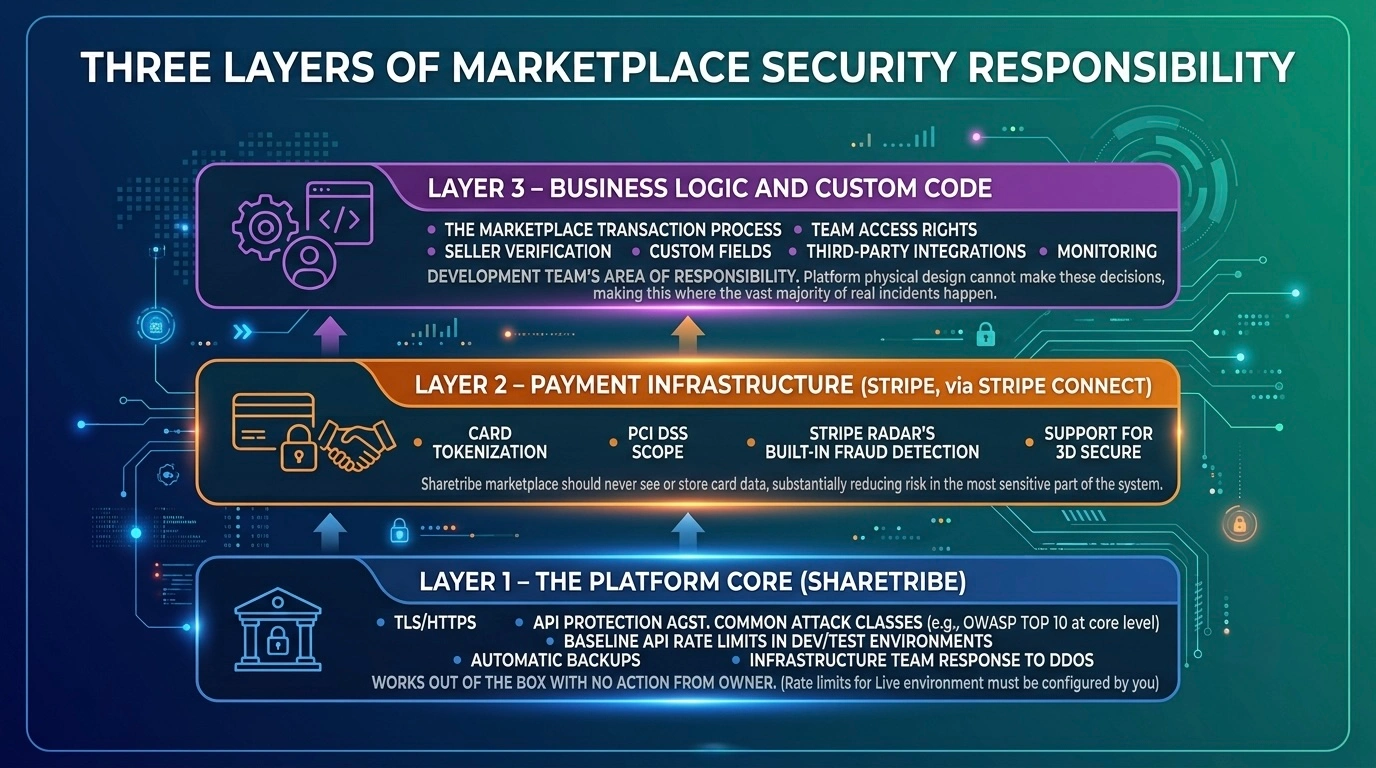
First, it helps to break down the specifics of Sharetribe marketplace security by layer – who is actually accountable for each one.
Layer 1 – The Platform Core (Sharetribe)
TLS/HTTPS, API protection against common attack classes (OWASP Top 10 at the core level), baseline API rate limits in Dev/Test environments, automatic backups, infrastructure team response to DDoS. This works out of the box and requires no action from the marketplace owner – though, as explained below, rate limits for the Live environment are largely something you need to configure yourself.
Layer 2 – Payment Infrastructure (Stripe, via Stripe Connect)
Card tokenization, PCI DSS scope, Stripe Radar’s built-in fraud detection, support for 3D Secure. A Sharetribe marketplace should never even see or store card data – this substantially reduces risk in the most sensitive part of the system.
Layer 3 – Business Logic and Custom Code
The marketplace transaction process, team access rights, seller verification, custom fields, third-party integrations, and monitoring. This is the development team’s area of responsibility – and in our experience, it’s where the vast majority of real incidents happen, because the platform physically can’t make these decisions for you.
We’ll go through each layer, but the main focus will be on the third one: the part where decisions are made not by the platform, but by the specific people configuring a specific marketplace.
What Sharetribe Already Protects
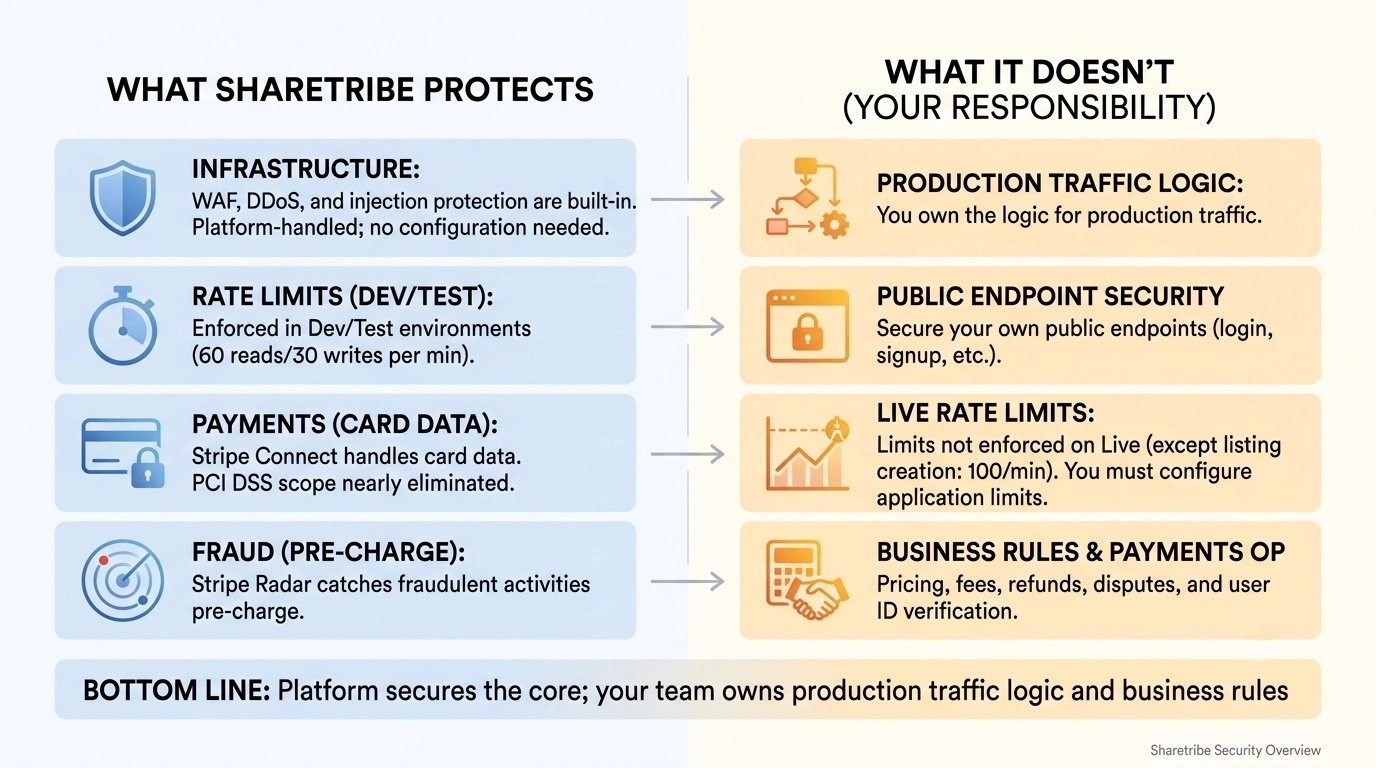
Core Infrastructure Protection
Sharetribe closes off the basic attack classes: injection, infrastructure misconfiguration, and DDoS – through a WAF and automatic scaling. That doesn’t mean you can forget about it; it means you don’t need to configure anything yourself here – the platform owns this layer regardless of your plan. This forms the foundation of any solid marketplace security checklist, covering the infrastructure-level controls that would otherwise be your team’s responsibility.
The Rate Limit Catch
There’s an important detail every marketplace owner should know: the official Marketplace API and Integration API rate limits (roughly 60 requests per minute for reads, 30 per minute for writes, per IP) apply by default only in Dev and Test environments. In the Live environment, where your actual marketplace runs, these limits currently aren’t enforced – with one exception: listing creation via the Integration API is capped at 100 calls per minute in any environment.
In other words, protecting production traffic from brute-forcing and automated abuse on your own public endpoints (a login form, a signup form) is, in most cases, already your development team’s responsibility, not something the platform handles “by default” for production traffic. The same applies to Stripe transactions Sharetribe – the platform secures the connection, but pricing, fees, and cancellation rules are yours to define and protect.
The Payment Layer Advantage
The payment layer deserves a separate mention. Through Stripe Connect, a marketplace never touches card numbers – Stripe processes and stores them, removing almost the entire PCI DSS scope from the platform owner. Stripe Radar analyzes transactions for fraud signals before the money is even charged. This is structurally the most secure part of a typical Sharetribe marketplace – provided the integration itself is done correctly (more on a common mistake below, in the webhooks section).
When issuing refund Stripe Sharetribe or handling disputes, everything stays within Stripe’s secure pipeline. This frees your team to focus on other critical areas like marketplace ID verification, ensuring users are properly validated before listing or transacting, without worrying about card data security.
What You Need to Configure on Top of the Defaults
Between “the platform handled it entirely” and “this is fully your custom logic” there’s a middle layer of settings that are available out of the box but require explicit activation:
- Two-factor authentication. In the no-code builder, marketplace 2FA is available indirectly – through social login, where the social provider has its own built-in 2FA. On the developer plan, 2FA can and should be added via custom code, especially for roles with elevated privileges. Roobykon’s guide on social login authentication covers implementation best practices.
- CAPTCHA/honeypot fields in signup and listing-creation forms – these reduce the effectiveness of automated spam and fake accounts at almost no development cost.
- Email/phone verification before a listing goes live or a first transaction takes place.
- A role model for the team inside Sharetribe Console – by default, it’s easy to give every team member full access; the right setup gives each person the minimum access they actually need.
None of these measures work “on their own” – they’re configuration choices that need to be made deliberately and turned on for your specific marketplace.
Custom Logic: Where the Real Work Happens
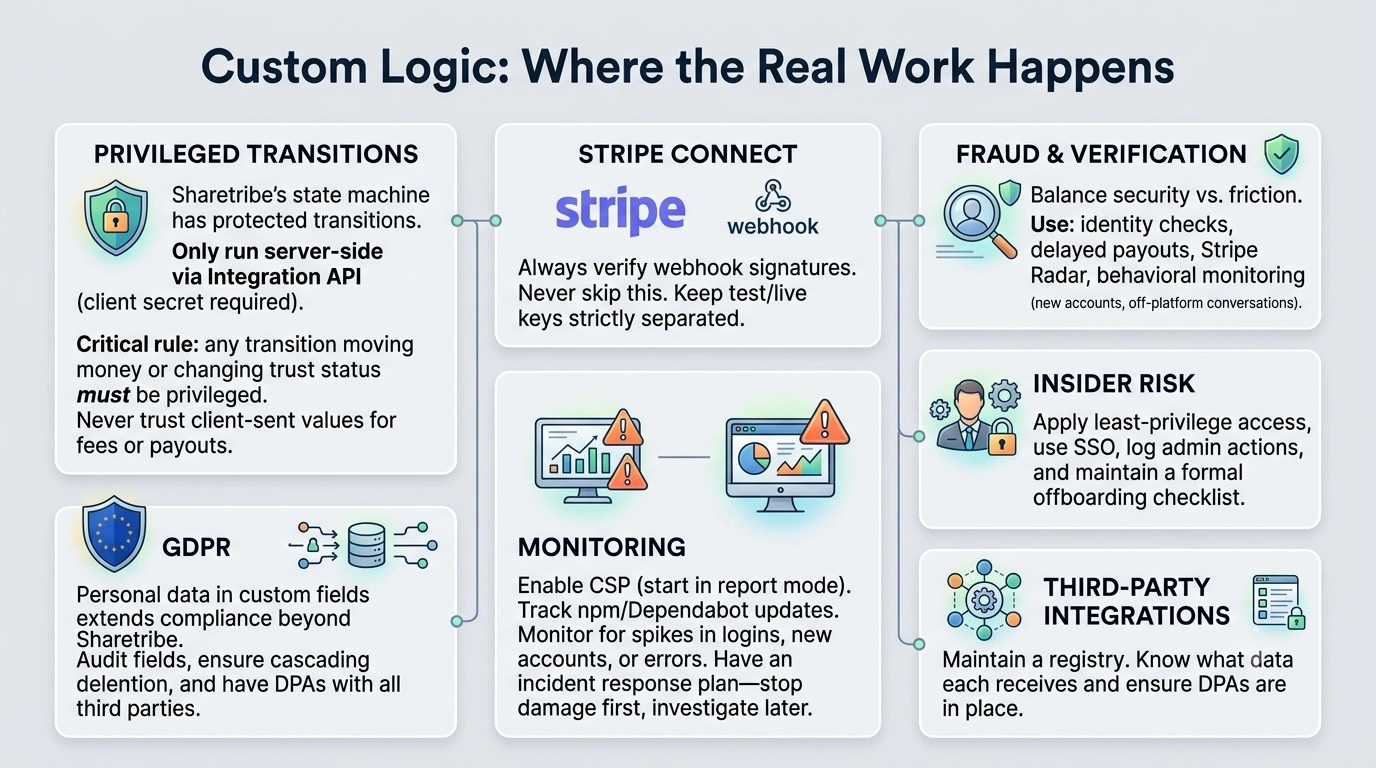
Transaction Process and Privileged Transitions
This is arguably the most underrated and, at the same time, the most critical part of Sharetribe marketplace security, and something almost never covered in general marketplace security articles, because it’s specific to this particular platform.
Sharetribe describes the lifecycle of a deal as a transaction process – a finite state machine: a set of states (inquiry, requested, accepted, delivered, completed, disputed, cancelled, and so on, depending on the business model) and transitions between them. Some transitions are marked as privileged – they can only be executed from a trusted server context via the Integration API with a client secret, not by the client application using a regular user token.
This is particularly important when setting transaction fees in Sharetribe – the privileged transition ensures the final commission and pricing are calculated server-side rather than trusting whatever values a client might send, preventing manipulation of fees or payouts.
If a developer forgets to mark a transition as privileged when it moves money (confirming a payment, releasing funds to a provider, issuing a refund) or changes a trust status, a user on the client side technically gains the ability to trigger that transition directly, bypassing business logic. In the worst case, that’s a direct path to losing money or bypassing seller verification. A malicious actor could, for example, cancel Sharetribe transaction or manipulate fees from the client side – a critical risk in any marketplace transactions system.
The practical rule we apply to every project: any transition that moves money or changes trust status must be privileged, and the marketplace transaction flow should be tested not just on the happy path, but also by attempting to call a privileged transition directly with a regular user token; such a request should reliably be rejected.
In practice, privileged transitions are most often used to calculate and lock in the deal’s price. For example, the privileged-set-line-items action ensures full server-side control over the final amount, so all Stripe transactions on Sharetribe are initiated with validated amounts. Calling such a transition requires a trusted token (exchanged via client secret), which lives only server-side and never in the client bundle.
javascript

// Example server endpoint that initiates a transaction with a privileged transition.

// The application's client secret is used only here - on the server -

// and is never sent to or stored in client-side code.

const { getTrustedSdk } = require('./api-util/sdk');

async function initiateTransactionWithPrivilegedPricing(orderParams) {

  const trustedSdk = await getTrustedSdk(orderParams);

  return trustedSdk.transactions.initiate({

    processAlias: 'default-booking/release-1',

    transition: 'transition/request-payment', // privileged? true in process.edn

    params: orderParams,

    // the server recalculates line items itself,

    // rather than trusting the price sent by the client

  });

}
One more detail worth knowing for an audit: in Sharetribe Console’s transaction process graph editor, privileged transitions are visually marked with a lock icon next to their name – the fastest way to manually confirm that every money-moving transition is actually protected, without reading the code.
Stripe Connect and Webhooks
The Stripe integration itself closes off most of the payment risk, but the specific implementation on the marketplace side is already the developer’s responsibility. Properly handling Stripe Connect webhooks is essential – these events notify your system about payment success, failures, and refunds. The most common mistake worth checking first is a missing signature check on incoming webhooks. Without it, the endpoint listening for Stripe events could, in theory, accept a forged request that never came from Stripe at all.
javascript

const stripe = require('stripe')(process.env.STRIPE_SECRET_KEY);

app.post('/webhooks/stripe', express.raw({ type: 'application/json' }), (req, res) => {

  const signature = req.headers['stripe-signature'];

  let event;

  try {

    event = stripe.webhooks.constructEvent(

      req.body,

      signature,

      process.env.STRIPE_WEBHOOK_SECRET

    );

  } catch (err) {

    return res.status(400).send('Webhook signature verification failed');

  }

  // Only process the event after the signature check succeeds

  res.json({ received: true });

});
Two more things we check in every integration: separation of test/live keys between environments (so test traffic can never physically reach a production Stripe account, or vice versa), and correct delayed-payout logic – if the marketplace uses escrow, the moment funds are actually released to the provider must be tightly tied to the right transaction process state, rather than to a separate, loosely connected action. These are non-negotiable marketplace security fundamentals that directly address core security requirements for a marketplace.
If you’re setting up Stripe for the first time, we’ve put together a practical walkthrough on how to open a Stripe account that covers key management and environment separation in more detail.
Seller Verification, Fake Accounts, and Fraud
Let’s be honest – there’s always a trade-off here. The more checks you add (document verification, manual listing approvals, delayed payouts), the safer you are from fraud. But every extra step also adds friction for honest sellers who just want to get started. So the trick is finding the right balance for your specific niche and risk level. Think of it like a cyber security marketplace mindset – fraud prevention isn’t a one-and-done task, it’s something you constantly adjust as you learn.
Roobykon’s multi-vendor marketplace development services emphasize the importance of building these controls into the platform architecture from day one – not bolt them on later. Following a solid marketplace security checklist from the very beginning saves a ton of headaches down the road, covering everything from identity checks to payment flows and data protection.
Mechanisms that usually work together:
- Marketplace identity verification before a listing goes live (automated or manual, depending on volume);
- Delayed payouts – funds aren’t released to the provider instantly, but held until receipt of the goods/service is confirmed;
- Stripe Radar as a built-in fraud-detection layer at the payment level;
- Behavioral signals on the marketplace side: clusters of new accounts with similar emails/IPs, listings published minutes after signup, attempts to move the conversation off-platform (a common sign of trying to bypass escrow and platform guarantees).
The stakes are high: global e-commerce fraud losses are forecast to more than double from over $40 billion in 2024 to more than $100 billion by 2029.
Marketplace fraud prevention is about making sure legitimate users can transact smoothly. That’s why we often implement a combination of automated checks and manual review workflows, tailored to the specific business model.
Over the years, we’ve developed custom monitoring rules for various clients: alerts on new listings from accounts younger than 24 hours, velocity checks on transaction attempts, and automated flagging of suspicious IP clusters. These features help detect fraud patterns early, and when something does slip through, the ability to catch and respond to it quickly through well-defined incident response procedures is essential to minimizing damage.
Console Access and Insider Risk
Not every threat comes from outside. A developer, or a former employee whose access was never revoked, is also part of the threat model, and this gets talked about less often.
A few practices largely close this gap:
- Least-privilege access: everyone gets the minimum set of rights they actually need in Console, the Stripe Dashboard, the repository, and production secrets;
- Centralized access management (SSO / a team password manager), so revoking access when an employee leaves or a contractor’s engagement ends takes minutes, not a manual round of password changes;
- Logging admin actions – the Sharetribe Events API lets you pull platform events and build an audit log on top of them;
- A formal offboarding checklist, not just “in principle,” but a concrete list that’s run through every time someone with production access leaves the project.
Personal Data in Custom Fields
Sharetribe provides basic tools for handling personal data, exporting, and deleting a user account. But once custom fields (custom user/listing fields) and third-party integrations (analytics, email marketing, CRM, chat) enter the picture, the GDPR perimeter extends well beyond what the platform itself can see.
What we typically check during an audit:
- Which custom fields actually store personal data, and whether any of them are excessive (“just in case” ID numbers, home addresses, and the like);
- Whether the right to erasure is applied cascadingly, not only within Sharetribe itself, but across every connected integration;
- Whether a data processing agreement (DPA) exists with every third-party service that receives personal data of marketplace users.
GDPR compliance for marketplaces is an ongoing obligation that grows with every new integration and custom field you add.
Monitoring, Dependencies, and Incident Response
Sharetribe’s custom frontend – which is essentially a fork of the Web Template – lives in the client’s own repository. That means security updates don’t just magically show up; you have to actively track them. We’re talking npm audit, Dependabot, Renovate – whatever works for you. But more importantly, every single change needs proper code review, especially anything touching the transaction process or access logic. It’s tedious, sure, but it’s a core part of Sharetribe marketplace security that too many teams overlook.
Now, Content Security Policy – this one’s interesting. In the Web Template, CSP is controlled by the REACT_APP_CSP environment variable, and here’s the catch: it’s disabled by default. So turning it on is a conscious choice you have to make, not something that happens out of the box. Our advice? Start with report mode – it logs policy violations without blocking anything. That way you can figure out which domains need to be allowlisted when you add things like analytics or a chat widget. Once you’re confident, switch to blocking mode for full enforcement. Just remember: every new third-party tool you connect will probably require updating the allowed sources in server/csp.js. Otherwise, CSP will either block a legitimate widget or – if you leave it in report mode – silently fail to protect you against XSS. Neither is ideal.
When it comes to monitoring, don’t get lost in all the noise. Focus on the signals that actually scream “something’s wrong”: a sudden spike in failed login attempts, an unusual surge in new accounts over a short period, or a weird jump in 4xx/5xx errors. And here’s the thing – your team should already have a plan for what to do when these alerts fire. You don’t want to be improvising while your marketplace is under attack. That’s a fundamental part of any solid security requirements for a marketplace – knowing your response playbook before you need it.
The key principle here: speed matters more than completeness in the first steps – stop the damage first (block the account, disable the vulnerable endpoint), and only then investigate the details and restore data from backup. A backup that’s never been tested for restoration can’t be considered a working plan – a test restoration should be run at least once a quarter.
Third-Party Integrations
Every integration you add – Zapier, analytics, a chat widget, a CRM – is basically a new door into your system. And each one is a potential vulnerability. So here’s a simple practice we swear by: keep a registry of all your integrations. Note down what data each one receives, whether you have a Data Processing Agreement in place, and who on the team is responsible for reviewing new integrations before they’re connected. It’s not glamorous, but it’s exactly the kind of discipline that turns a cyber security marketplace approach from a buzzword into something that actually protects your business. Think of it as your own lightweight marketplace security checklist – one that evolves as your platform grows.
Marketplace Security Checklist: What to Review on Your Marketplace
Measure | Who’s responsible | Priority |
|---|---|---|
HTTPS/TLS | Sharetribe | Baseline |
Rate limiting on public APIs | Sharetribe (Dev/Test) + custom (production) | High |
2FA for users | Custom implementation / SSO | Medium |
2FA/SSO for the team and Console admins | Development team | High |
Privileged transitions in the transaction process | Development team | Critical |
Stripe webhook signature verification | Development team | Critical |
Separation of test/live Stripe keys | Development team | High |
Seller verification | Development team/configuration | Medium |
Cascading data deletion for GDPR | Development team | High |
Admin action audit log | Sharetribe Events API + custom wrapper | Medium |
Access offboarding process | Development team/client | High |
Dependency updates for the forked Web Template | Development team | Medium |
Backups + tested restoration | Sharetribe (backup) + team (test) | High |
Checklist by Marketplace Growth Stage
Stage | Focus | Required measures |
|---|---|---|
MVP | Basic hygiene | HTTPS, Stripe Connect instead of storing cards yourself, baseline rate limits |
Growth | Formalizing processes | Seller verification, escrow, custom rate limits calibrated to real traffic, 2FA for the team |
Enterprise | Full security practice | Regular penetration testing, a dedicated security contact, an incident-response SLA, and compliance tailored to the vertical |
Conclusion: Building Trust Through Marketplace Security
Security for a Sharetribe marketplace is a balance across three layers of responsibility, where the platform and the payment provider cover the infrastructure, and the development team owns everything tied to specific business logic: transaction rules, access rights, personal data handling, and incident response.
It’s this third layer where real problems most often show up, because the platform simply can’t decide, on your behalf, how your specific business should be configured. The security requirements for a marketplace evolve as you grow, and what works for an MVP won’t be sufficient for an enterprise-grade platform.
If you’re launching a new Sharetribe marketplace, or taking over support for an existing one, it’s worth starting with a security audit of exactly this third layer: the transaction process, access rights, and integrations. Roobykon runs audits like this as part of our work customizing and maintaining Sharetribe marketplaces.
Because in the end, marketplace security isn’t about checking boxes. It’s about building trust – with your users, your partners, and your team.
[Ready to secure your marketplace? Contact Roobykon for a comprehensive security audit of your Sharetribe custom code, transaction logic, and integrations before a vulnerability finds you first.]
Ready to secure your marketplace?
Contact Roobykon for a comprehensive security audit of your Sharetribe custom code, transaction logic, and integrations before a vulnerability finds you first.
Get in touch
Recommended articles
 Sharetribe Reviews 2026: An Honest Look at the No-Code Marketplace Platform
Building a marketplace in 2026? Stop scrolling – this Sharetribe review is your reality check. We've crunched the numbers, analyzed real customer feedback, and mapped the platform against every marketplace type.
 Why AI-generated marketplace MVPs break early, and what stops them from scaling
Marketplaces are complex systems. AI coding tools optimize for the prompt, not the long term, producing code that demos well but collapses under users. Roobykon Software examines the seven architectural failures that break AI-generated MVPs.
 Social Login Authentication for Sharetribe Marketplaces
How to implement social login on Sharetribe: A step-by-step breakdown of what it really takes to add Apple, LinkedIn, and other providers. Includes common problems and proven solutions from marketplace experts.
 The Ultimate Guide on How To Build a Multi-Vendor Marketplace in 2026
Unlock the secrets of successful marketplaces. This guide explains how a multi-vendor website works and provides a clear plan to build your own, from validating your idea to launching and driving growth.