Why does the moment after “Book” matter so much?
What is a booking confirmation?
What does a booking confirmation look like?
How do calendar booking transactions work in Sharetribe?
Should you use manual or automatic booking confirmation?
How to set up the booking confirmation feature in Sharetribe?
Why does availability management make or break confirmation?
What mistakes break booking confirmation on a marketplace?
Subscribe and you will promptly receive new published articles from the blog by mail
What is a booking confirmation? It’s the moment a marketplace turns a customer’s “I want this” into a guaranteed reservation. In Sharetribe, it can happen in two ways: the provider manually accepts each request, or the booking is confirmed automatically at checkout. Below, we walk through both flows on a live booking confirmation marketplace, with screenshots, and explain which one fits your business.
How your platform handles that wait decides a lot. It shapes conversion, refunds, support tickets, and how much providers trust you. At Roobykon, we help founders build a custom marketplace with Sharetribe every week, and the confirmation step is where we see them make (or lose) the most money.
The examples in this article come from FromLocals, an Italian experiences marketplace. We recorded both flows end to end, so you can see exactly what each party sees. Prefer video? Watch the full walkthrough on YouTube.
- What does a booking confirmation look like? A short receipt plus a conversation thread: status line, start and end time, price breakdown, activity feed, message box, and one clear next action.
- How to set up the booking confirmation feature in Sharetribe: create a listing type with the calendar booking process, pick the booking unit, then choose whether "accepted" waits for the provider or fires automatically at checkout.
- Calendar booking transactions work as a state machine: request, confirmation, decline or expiry, completion. Each transition moves money, emails, and calendar slots.
- Enable bookings by the day, night, or hour to match how providers sell their time – hourly for lessons and tours, daily for equipment, nightly for accommodation.
- Manual confirmation buys control, automatic confirmation buys conversion. Most marketplaces need both, set per listing.
- The strongest Sharetribe features behind confirmation are the calendar booking transaction process, availability management with seats and exceptions, and transaction-based messaging.
Why does the moment after “Book” matter so much?
Because that’s when a customer decides whether to trust your marketplace. A clear booking confirmation turns nervous clicking into a planned weekend; a vague one turns it into a support ticket.
Picture Marta in Milan, 23:40 on a Tuesday. She finds a private ski lesson on a booking confirmation website, clicks “Request to book” and goes to bed.
By breakfast, the instructor has accepted, and her calendar has a slot for Monday at 08:00. She feels looked after.
Now picture the same Tuesday on a different platform. Marta clicks, sees a spinner, then a generic “Thank you” page with no status, no dates, and no word on whether her card was charged.
She books a lesson somewhere else “just in case”. The first marketplace loses both the sale and the provider’s time.
The difference between those two mornings isn’t the instructor. It’s the confirmation design, and every booking confirmation marketplace gets to choose which Tuesday its customers live through.
What is a booking confirmation?
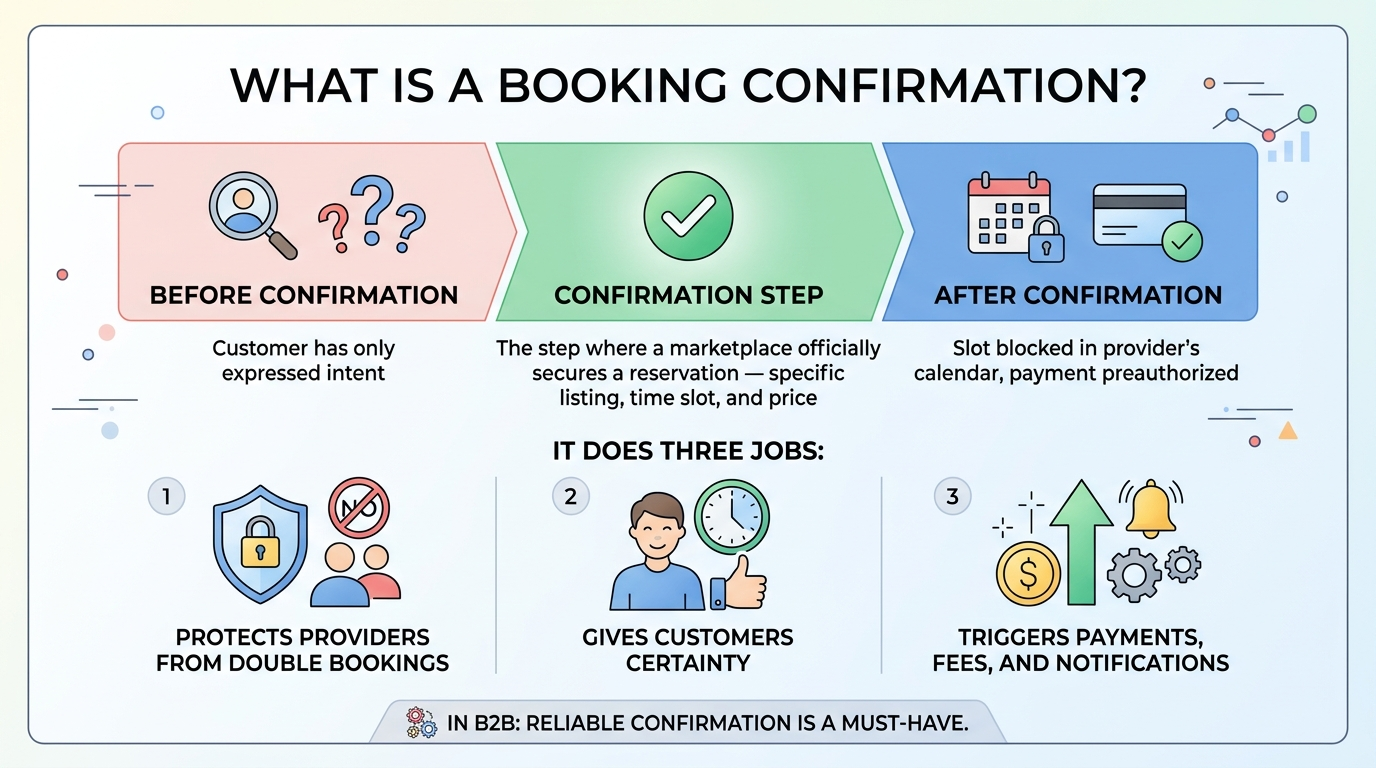
Booking confirmation is the step where a marketplace officially secures a reservation for a specific listing, time slot, and price. Until that point, the customer has only expressed intent. After it, the slot is blocked in the provider’s calendar, and payment is preauthorized.
On a booking confirmation marketplace, this step does three jobs at once. It protects the provider from double bookings, gives the customer certainty, and gives the platform a clean trigger for payments, fees, and notifications. In B2B, a reliable confirmation is one of the features buyers and sellers need in B2B marketplaces.
Confirmation vs. request: why the difference matters
A booking request is a question: “Can I have Monday 31 August, 08:00–10:00?” A booking confirmation is the answer.
Some businesses need a human to say yes, for example, a guide who checks weather and group size. Others sell standardized slots and can say yes instantly. And if you create a demand-driven marketplace, the roles flip: the customer confirms the provider’s offer instead.
What does a booking confirmation look like?
On a well-built booking confirmation website, it looks like a short receipt plus a conversation thread. The customer sees the listing, booking start and end, a price breakdown, and a status line. The provider sees the same booking, plus their fee and net earnings.
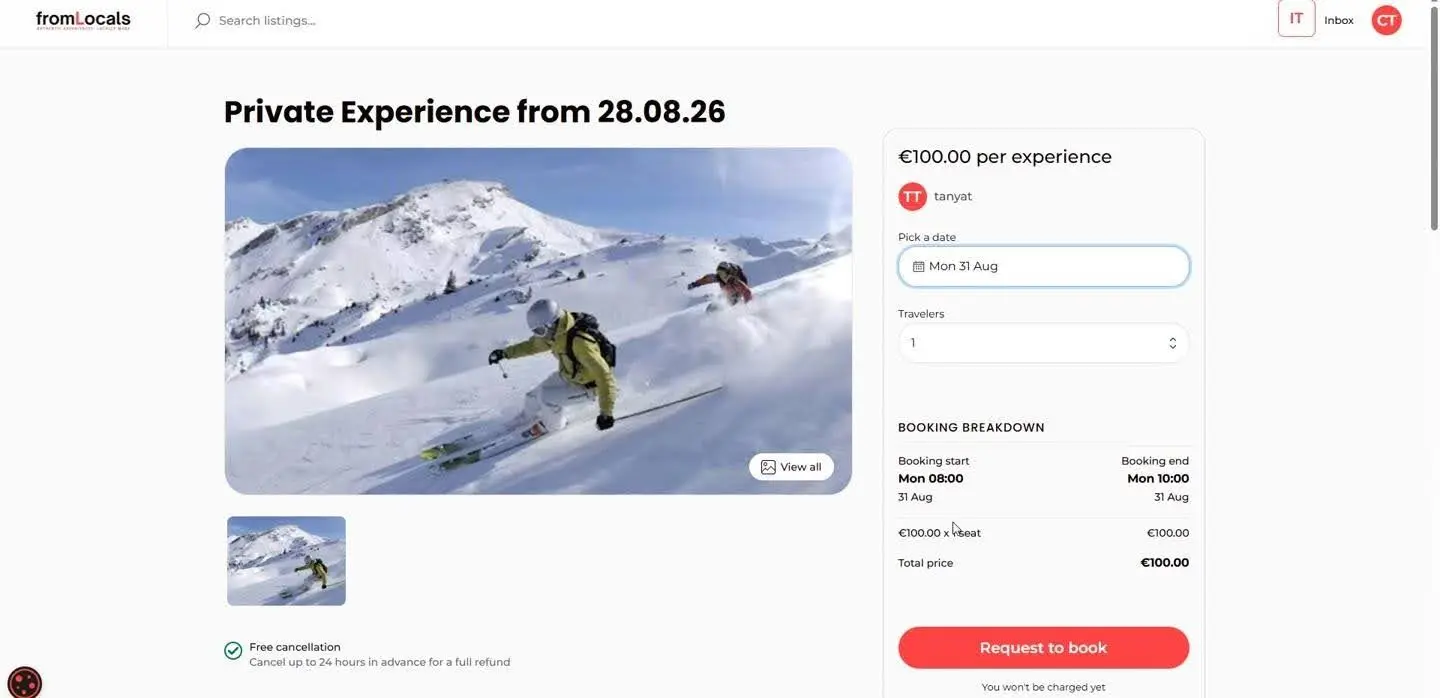
It all starts on the listing page. The customer picks a date, and Sharetribe instantly calculates the booking breakdown before any money moves. If you run promotions, a promo code lowers that total at checkout, so it’s worth knowing how to create a discount code in Sharetribe.
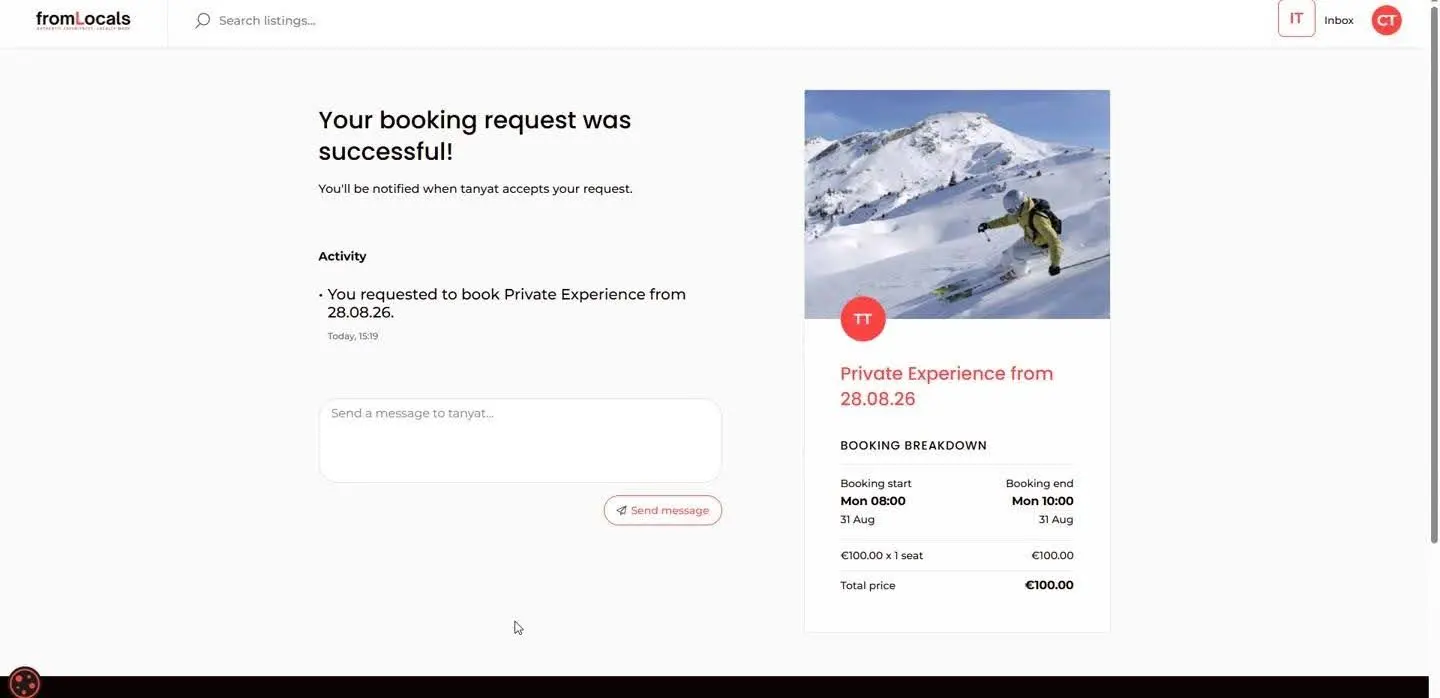
After checkout, the customer lands on a transaction page. It carries an activity feed (“You requested to book…”), a message box for the provider and the order summary on the right. That page is the confirmation itself, and it’s also where any change of status will appear later.
One note on the demo: payment on the platform happens offline, so this is a booking request without online payment. With Sharetribe standard online payments, the customer’s card would be pre-authorized at the request step and captured once the provider accepts.
What should every booking confirmation include?
A good booking confirmation answers the 5 questions a customer will otherwise email you about: what, when, how much, what now, and how to reach someone. Here’s the anatomy we use as a checklist on Sharetribe projects.
Element | Why it matters | Where it appears on the marketplace |
|---|---|---|
Status line | Tells the customer if the slot is theirs yet | “Your booking request was successful!” or “Your booking was successful!” |
Booking start and end | Prevents arguments about time zones and dates | “Mon 08:00 – Mon 10:00, 31 Aug” in the summary |
Price breakdown | Shows exactly what is charged and when | Unit price × seats, total price |
Provider earnings | Builds provider trust in the platform fee | Subtotal, FromLocals fee, “You’ll earn” |
Activity feed | Creates a timeline both sides can refer to | “You requested to book…”, “You accepted…” |
Message box | Moves questions out of email and into the platform | “Send a message to…” under the feed |
Next action | Gives each side one clear thing to do | Accept / Decline for providers, Cancel for customers |
If your page covers all seven, you’ve answered what does a booking confirmation look like for both sides of the deal.
How do calendar booking transactions work in Sharetribe?
Calendar booking transactions work as a state machine: each booking moves through fixed stages, and every stage triggers payments, emails, and calendar updates. Sharetribe calls this a transaction process, and the calendar booking process is one of its core Sharetribe features.
You can enable bookings by the day, night, or hour. Day and night units suit rentals and accommodation. Hourly units suit lessons, tours, and services like the ski experience in our screenshots.
Stage | What the customer sees | What happens behind the scenes |
|---|---|---|
Request / book | Booking breakdown, checkout | Card is pre-authorized, slot is held |
Confirmation | “Accepted” or “booked” status | Slot blocked, payment captured |
Decline or expiry | Request declined notice | Hold released, slot reopens |
Completion | Booking marked done | Auto-completed 48 hours after the booking ends, then payout and a 7-day review window |
Sharetribe’s own guide to how calendar booking transactions work adds the exact timings. A charge is placed on the card when the request is sent and can be held for up to 6 days. If the provider accepts, the charge is captured, and the platform commission is transferred right away.
A request expires automatically at the earliest of three moments: no response within 6 days (when the booking starts more than 6 days out), one day after the booking start date, or when the booking period ends. Under the hood, the availability reference explains that bookings only change state through transaction transitions, which is why a confirmed slot can’t be double-sold.
The confirmation stage is the one you can configure. You decide whether a person approves it, or the system does. Not every platform gives you this control, which is a good reason to compare marketplace solutions before launch.
When should you enable bookings by the day, night, or hour?
Match the booking unit to how the provider actually sells their time. Pick the wrong one and confirmations will be technically correct but commercially awkward, like charging a holiday flat by the hour.
Booking unit | Best for | Example listing | Confirmation tip |
|---|---|---|---|
Hour | Lessons, tours, consultations, studio time | 2-hour private ski lesson, 08:00–10:00 | Auto-confirm works well when slots are fixed |
Day | Equipment, vehicles, venues, coworking | E-bike rental, Fri to Sun | Show pickup and return times on the confirmation |
Night | Accommodation, glamping, boats with cabins | Mountain chalet, 3 nights | Manual confirmation if hosts screen guests |
Mixed catalogs are common. A travel marketplace can sell hourly tours and nightly stays side by side, each with its own confirmation mode.
What happens to the calendar after confirmation?
The confirmed slot disappears from the public calendar the moment the transaction moves to “accepted” or “booked”. If the listing has several seats, only the booked seats are removed. This is the quiet part of how calendar booking transactions work, and it’s what stops a 3-seat tour from selling a fourth seat.
Should you use manual or automatic booking confirmation?
Use manual confirmation when providers need to vet each customer or check conditions. Use automatic confirmation when slots are standardized, and speed drives sales. Many marketplaces need both, set per listing.
Manual confirmation | Automatic confirmation | |
|---|---|---|
Button on listing | “Request to book” | “Book now” |
Who confirms | Provider clicks Accept | System, at checkout |
When the card is charged | Held at request, captured when the provider accepts | Immediately at booking |
Customer waits | Until provider responds | Not at all |
Provider control | Full: accept or decline | Relies on accurate availability |
Best for | Tours, rentals, high-value or custom services | Classes, fixed slots, repeat customers |
The trade-off is control versus conversion. A request flow lets a guide decline a beginner for an off-piste trip. An instant flow removes the anxious wait that makes customers open a competitor’s tab, and it’s among the latest trends in building marketplaces.
How to set up the booking confirmation feature in Sharetribe?
To set up booking confirmation in Sharetribe, create a listing type that uses the calendar booking process, choose the booking unit, and decide whether a transition to “accepted” waits for the provider or fires automatically. Request-based confirmation works out of the box. Automatic confirmation usually means customizing the transaction process.
Step 1: Configure the listing type
In Sharetribe Console, open the listing types settings and pick the calendar booking process. Set the unit (day, night or hour) and the fields providers fill in. Sharetribe notes that transaction settings are configured when you create the listing type, so decide on confirmation before providers start publishing.
For automatic booking confirmation, your developer edits the transaction process with Sharetribe CLI. Sharetribe even publishes an instant booking process in its example repository, described in the payment methods overview. If you’ll run both modes, give providers a clear choice when they create a listing.
Part 1: The manual confirmation flow
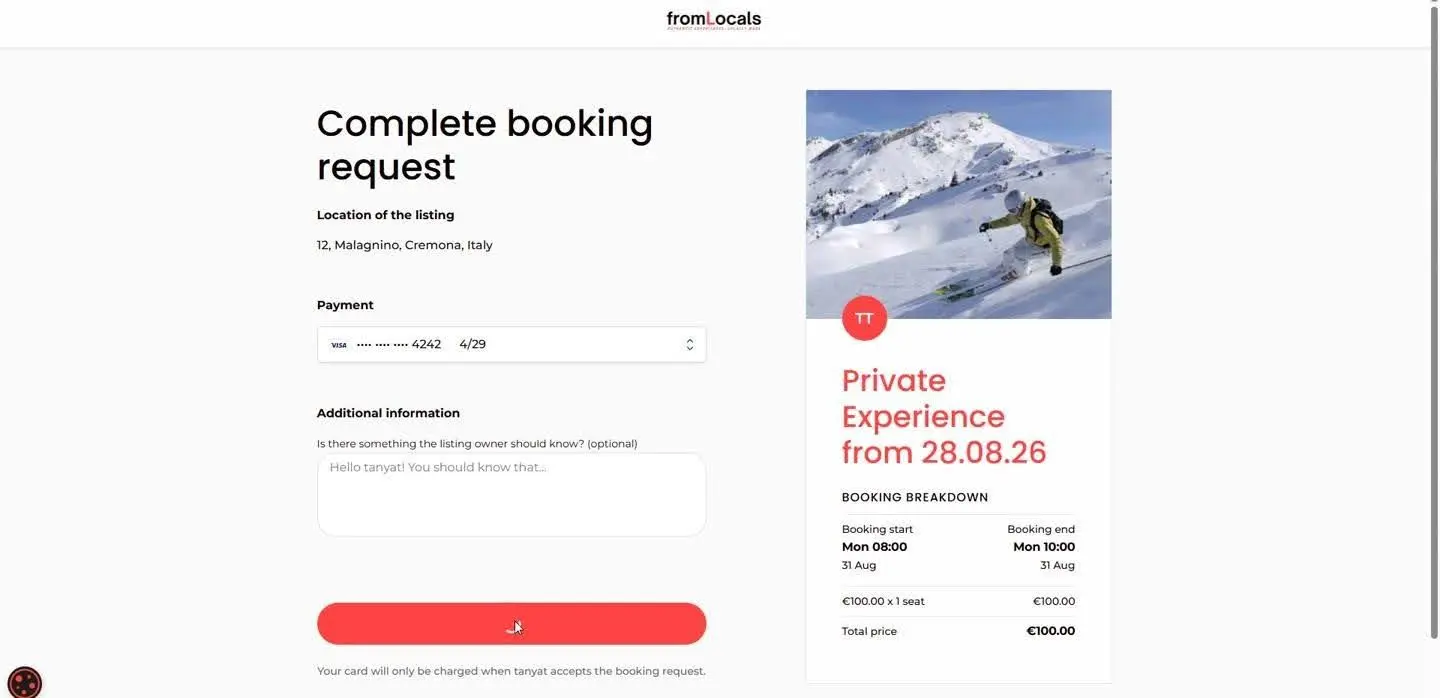
The customer picks a slot and clicks Request to book. On checkout, the button reads Confirm booking request, and a note explains the card is only charged once the provider accepts.
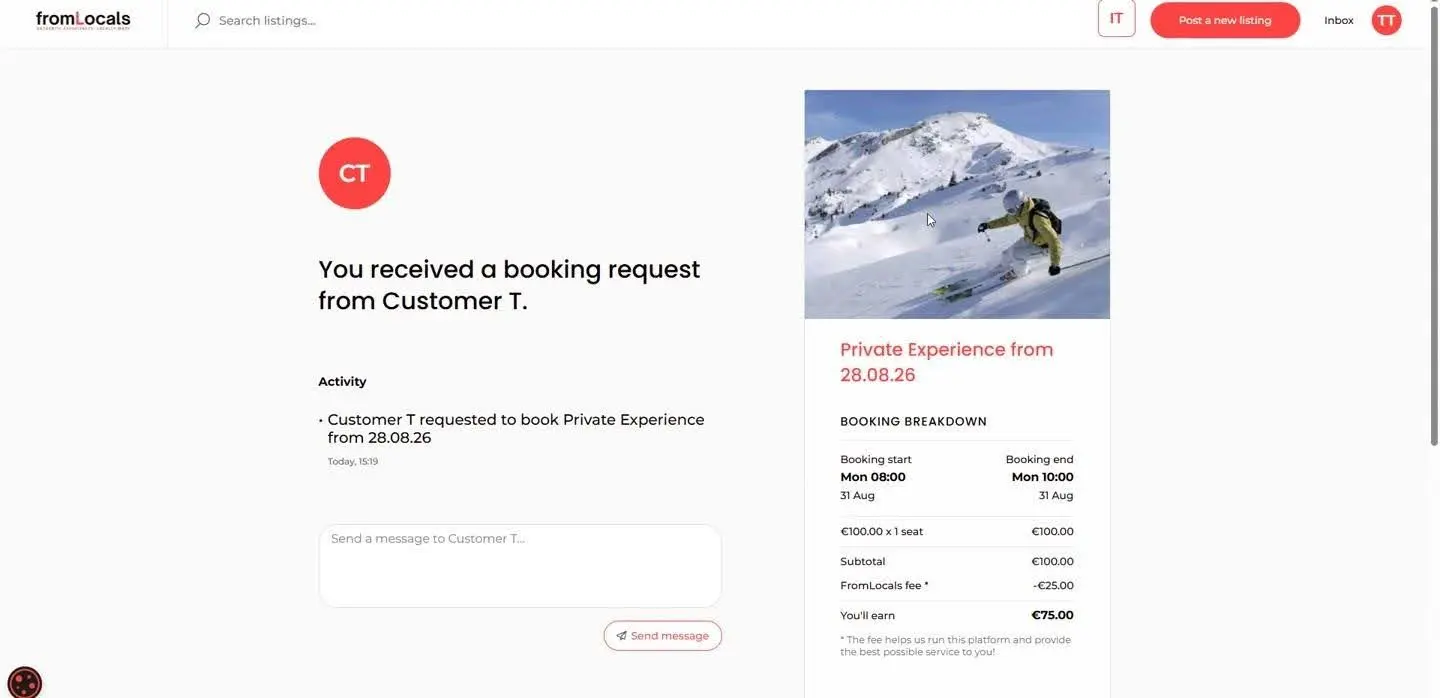
The provider immediately gets a notification: “You received a booking request from Customer T.” The page shows the dates, the €100.00 subtotal, the €25.00 platform fee and €75.00 net earnings.
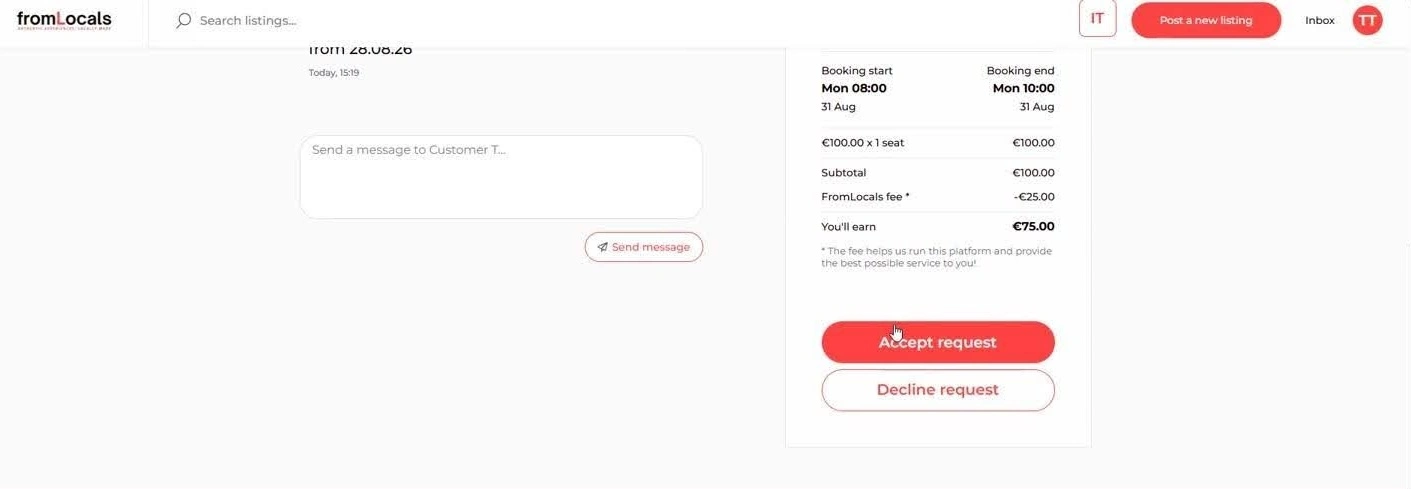
At the bottom of the summary sit two buttons: Accept request and Decline request. This is the manual confirmation itself.
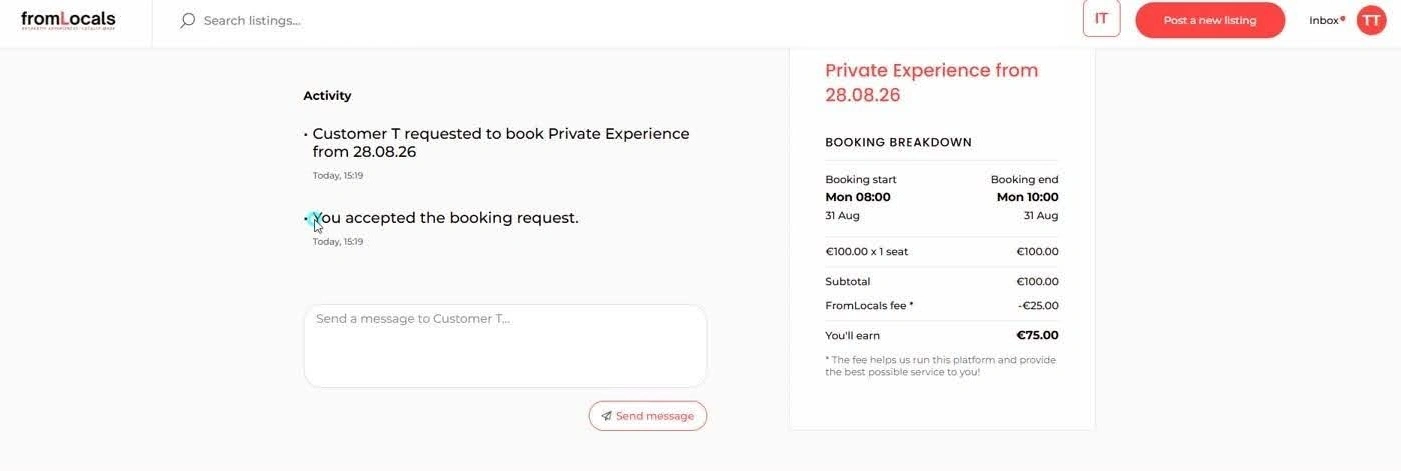
Once the provider accepts, the activity feed updates to “You accepted the booking request.” The card is charged, the slot is locked and both sides get an email.
Part 2: The automatic confirmation flow
On an auto-confirmed listing, the main button says Book now instead of “Request to book”. The customer picks a date from the calendar, sees the breakdown and pays.
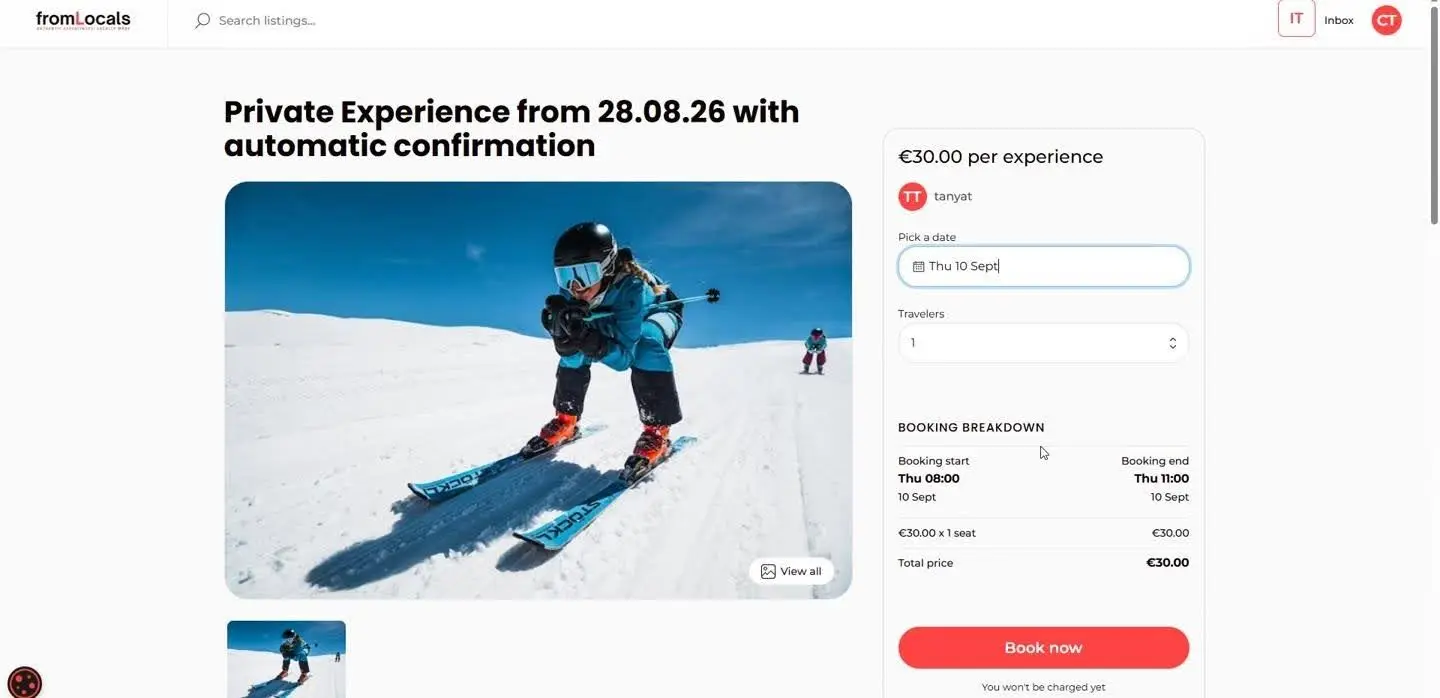
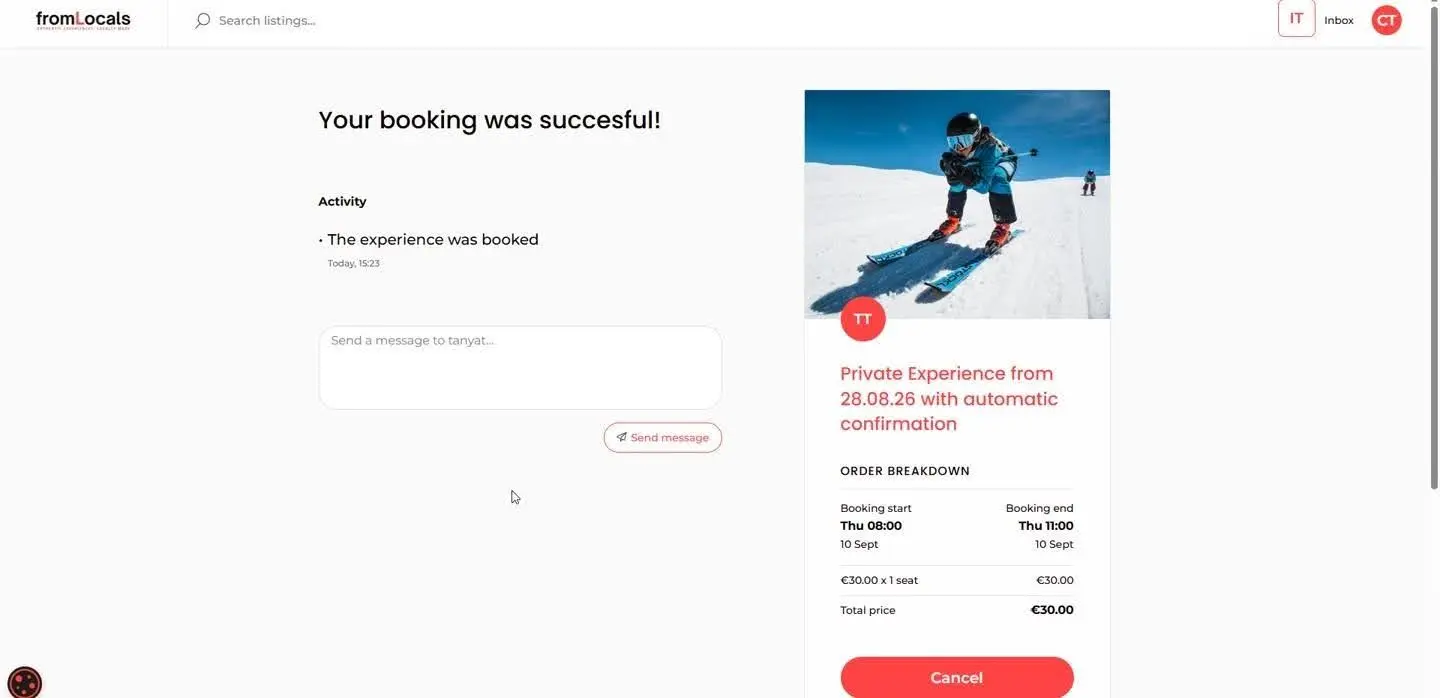
There’s no waiting screen. The customer goes straight to “Your booking was successful!” with the status “The experience was booked” and a Cancel option.
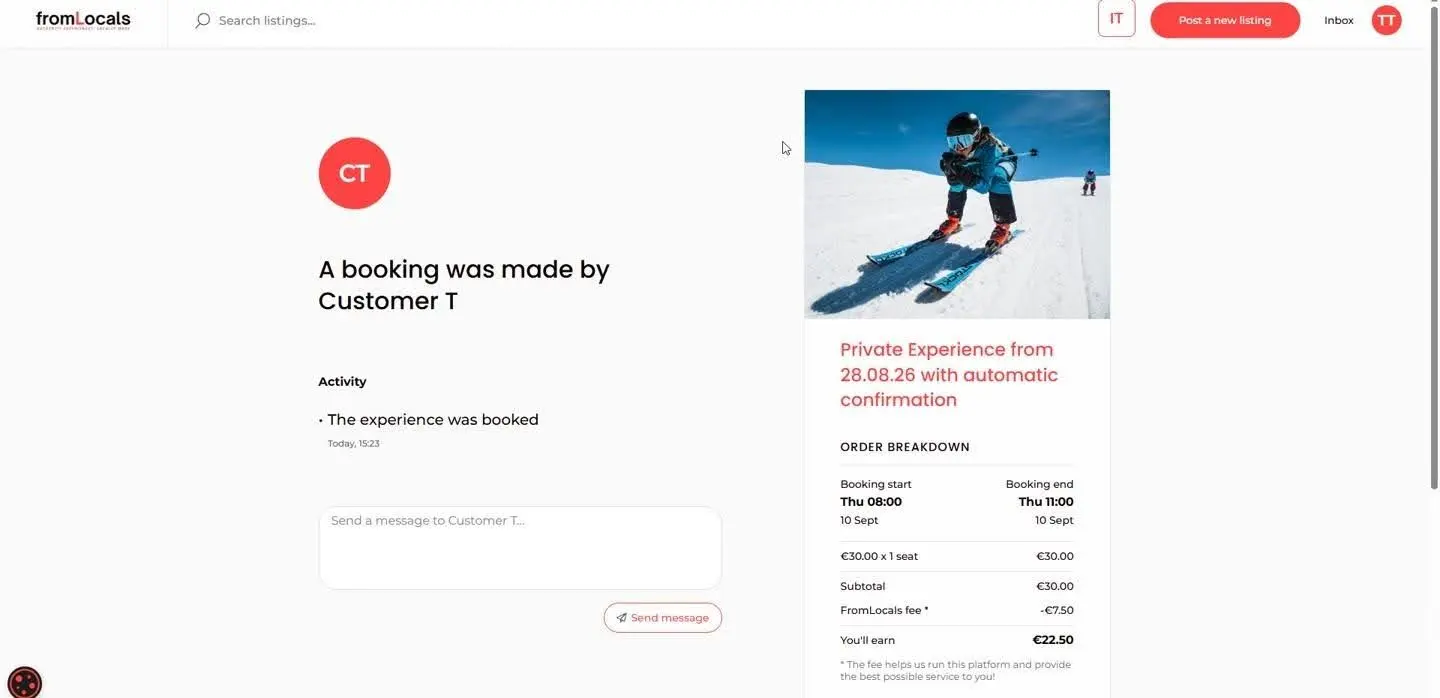
The provider doesn’t approve anything. They simply receive “A booking was made by Customer T” with the €30.00 subtotal, €7.50 fee and €22.50 earnings.
Step 2: Test the flow as both customer and provider
Open two browsers, log in as a customer in one and a provider in the other, and book your own listing. The FromLocals walkthrough follows the same pattern, switching between customer and provider views. You’ll spot gaps in seconds: a missing price line, a confusing button label, an email that arrives before the status updates.
Run the test at least three times: an accepted request, a declined request, and an instant booking. If your marketplace supports cancellation, test that too, because the customer’s Cancel button on an auto-confirmed booking is a confirmation screen in reverse.
Step 3: Rewrite the notifications in your brand voice
Sharetribe’s default emails are functional. Yours should sound like your marketplace. “Tanya accepted your ski lesson, see you on the slopes Monday at 08:00” beats “Your booking request has been accepted” every time.
You can edit the default email texts in Sharetribe Console’s Email texts editor without code. Adding or removing whole notifications, such as a reminder to providers who haven’t answered, does require development work.
This is the cheapest upgrade on the whole list, and it’s the part of how to set up the booking confirmation feature that founders most often skip.
Why does availability management make or break confirmation?
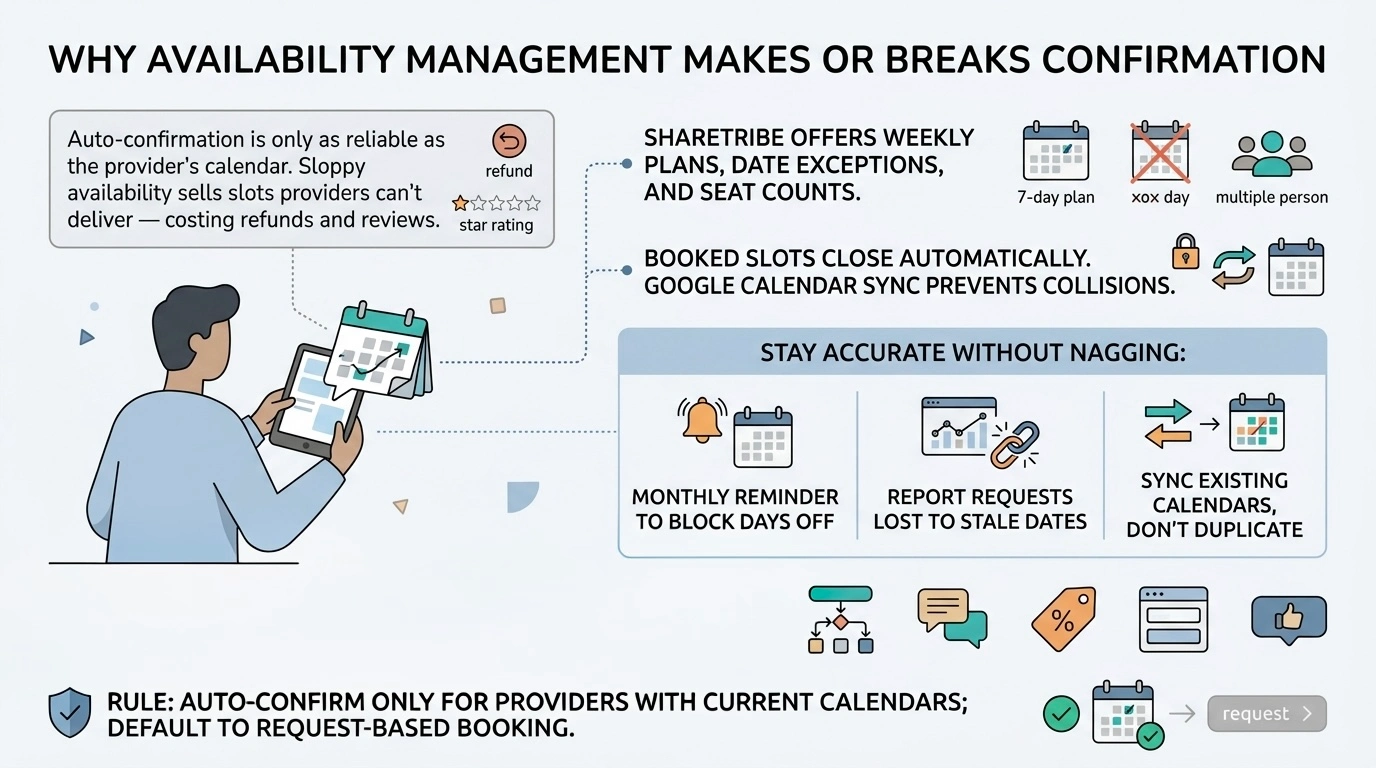
Automatic confirmation is only as reliable as the provider’s calendar. If availability management is sloppy, “Book now” sells slots the provider can’t deliver, and you pay for it in refunds and reviews.
Sharetribe gives providers a weekly availability plan, date exceptions, and seat counts per slot. Booked slots close automatically, so two customers can’t grab the same Monday 08:00. For providers who also sell on other channels, a Sharetribe booking calendar integration with Google Calendar keeps external events from colliding with marketplace bookings.
How do you keep availability accurate without nagging providers?
Make the calendar the easiest thing in the provider dashboard to update. Good availability management is mostly a UX problem, not a technical one.
Three habits help:
- Monthly nudge. Send providers a short email asking them to block holidays and days off.
- Show the cost. Tell them how many requests they lost to stale dates last month.
- Sync, don’t duplicate. For top providers, connect their existing calendar so they never update two places.
Which other Sharetribe features support the booking flow?
Three Sharetribe features do most of the work around confirmation: the calendar booking transaction process, availability management with seats and exceptions, and built-in messaging. According to Sharetribe’s messages documentation, messages always belong to a transaction, so every question and answer stays attached to the booking it’s about.
Around that core, promo codes drive the first booking and transaction fields collect extra details at checkout, like skill level for a ski lesson. B2B platforms often stack an approval step on top of confirmation.
Our rule of thumb: launch auto-confirmation only for providers with up-to-date calendars, and keep request-based booking as the safe default for everyone else.
What mistakes break booking confirmation on a marketplace?
Most booking confirmation marketplace problems aren’t bugs. They’re design choices that look fine on a whiteboard and hurt in production.
4 mistakes come up again and again when we review booking flows. Each one is cheap to fix before launch and expensive after.
Mistake | What it looks like | How to fix it |
|---|---|---|
The ghost provider | Requests sit unanswered until they expire after 6 days | Reminder emails, a response-time badge, auto-confirmation for reliable providers |
The optimistic calendar | “Book now” sells a slot the provider blocked in their head, not in the calendar | Gate instant booking behind recent calendar activity or a synced calendar |
The mystery fee | The total at confirmation differs from the listing page | Show one breakdown on every screen |
The dead-end page | A “Thanks!” page with no dates, status or next step | Add status, dates, message box and one clear action |
Notice that none of these are code bugs. They’re product decisions, which is good news: you can fix them in a sprint, not a rebuild.
What else do people ask about booking confirmation?
Is booking confirmation built into Sharetribe?
Yes. For most people searching for booking confirmation in Sharetribe, the answer is the request-based flow, which ships with the standard calendar booking process. The provider accepts or declines, and Sharetribe handles the card hold, capture and emails.
Development work is only needed if you customize it, for example, to add automatic confirmation, a customer-side Cancel button or extra approval steps. Those changes live in the transaction process, so they don’t touch your listings or design.
Can one marketplace use both confirmation modes?
Yes. You can have “Request to book” and “Book now” flows on the same platform, as the screenshots above show. The mode is chosen per listing, so a guide can keep manual approval for off-piste trips and auto-confirm group lessons. This kind of per-listing flexibility is one of the most practical Sharetribe features for a booking confirmation marketplace, because it lets each provider match the flow to the risk and rhythm of their service.
The customer always knows which mode applies before paying, because the button label and checkout note change. That small piece of copy prevents most “why haven’t I been confirmed yet?” support tickets.
What happens if a provider never responds to a request?
The request expires. In Sharetribe’s default process, that happens after 6 days without a response, one day after the booking start date, or when the booking period ends, whichever comes first.
The charge on the card is cancelled, the slot reopens, and the customer is notified, so nobody pays for a booking that never happened. This automatic release is tied to the platform’s availability management, which keeps calendars accurate without manual cleanup. Operators can also accept or decline on the provider’s behalf from Console before the request expires.
Does booking confirmation work for demand-driven platforms?
It does, with a twist. On a reverse marketplace, the customer posts a need, providers send offers, and the customer confirms the offer they like instead of the other way around.
The confirmation page still needs the same essentials: dates, price, status, and a message box. Only the person pressing “Accept” changes.
How do providers get paid after a booking is confirmed?
On acceptance, the payment is captured, and the provider’s earnings are held in the platform’s Stripe account. Booking confirmation in Sharetribe style works here because the platform automatically marks the transaction completed 48 hours after the booking period ends, and that triggers the payout to the provider’s bank account.
Operators can also mark a booking completed earlier from Console. Funds can typically be held for up to 90 days, though Stripe’s rules vary by country.
How do calendar booking transactions work with cancellations?
A cancellation is one more transition in the same transaction process. It releases the slot back to the calendar and refunds the customer. In Sharetribe’s default calendar booking process, only the operator can cancel from Console, and only between acceptance and completion, with a full refund.
You can extend this: auto-confirmed bookings can show a Cancel button right on the customer’s confirmation page, so customers don’t need to email support.
Can I change the confirmation mode after launch?
Yes. Because booking confirmation in Sharetribe is tied to the transaction process, you can move listings between manual and automatic modes later. Transactions already in progress finish on the process version they started with, so nobody’s reservation changes mid-flight.
Plan the switch for a quiet season and tell providers in advance. A provider who suddenly gets instant bookings needs an up-to-date calendar on day one.
What should you do next?
Start with how your providers actually work. If they need to vet customers, keep manual confirmation. If they sell standardized slots and keep calendars tidy, auto-confirmation will lift conversion.
Customers increasingly expect instant booking and availability management, so plan for it even if you launch with requests. When you’re ready, our Sharetribe team can set up both booking confirmation flows for you.
Ready to launch?
Roobykon Software sets up manual and automatic booking confirmation flows, including custom transaction processes, per-listing modes, and branded notifications.
Book a call
Recommended articles
 Must-have features for launching a trusted vehicle-sharing platform
Trust is everything in shared mobility. This article unpacks how intuitive UX, transparent pricing, secure payments, and flexible admin tools come together to build user loyalty. Learn from real examples and best practices shaping the future of car sharing.
 Roobykon’s Implemented Favorites Feature: Save Time, Stay Organized
With just a click of a button, you can now save your favorite products and sellers, creating a personalized list of all the items you're interested in. Not only does this save you time and effort, but it also allows you to keep track of the products or services you're considering.
 Top 10 Features for B2B Marketplace
Discover the key features that can elevate your B2B marketplace to new heights! Our latest infographic outlines the top 10 features for B2B platforms. Explore it now and unlock your marketplace's full potential!
 How to Prepare Your B2B Marketplace for Black Friday: Technical and Conversion Checklist
Founders: here's how to prepare a B2B marketplace for Black Friday without touching the tech yourself. One goal, defensible offers, seller deadlines, and the right questions for your developer.