Why Standard Search Feature For Website May Not Be Enough
The Advanced Search Plugin For Marketplace We Built
How Adding a Search Feature To a Website Improves the Marketplace Experience
How We Adapt Advanced Search to Different Marketplace Models
How the Feature Was Implemented
Subscribe and you will promptly receive new published articles from the blog by mail
Type “cessna” into a basic marketplace search bar and you’ll get one of two things: a wall of loosely related results, or nothing at all. Neither helps the person on the other end, and neither helps the marketplace owner who paid to bring that visitor to the site in the first place.
This is the moment where a lot of marketplaces quietly lose money. Industry research puts the number of e-commerce visitors who rely on internal search for marketplace at up to 30%, and these users convert at 2-3 times the rate of people who just browse. Walmart’s conversion rate jumps from 1.1% to 2.9% when a shopper uses search. Etsy sees a 3x lift. But the flip side is just as stark: the majority of shoppers say they’d abandon a retailer entirely after a frustrating search experience, and a significant share never return.
Sharetribe ships with a capable default search, and for many marketplaces, that’s genuinely enough. But once inventory grows complex – layered categories, technical naming conventions, or catalogues where two listings look nearly identical – the standard search feature on website starts to show its limits.

We ran into exactly this while building an aviation marketplace on a customised Sharetribe codebase. Aircraft listings aren’t like sneakers: a single term like “Cessna” can map to dozens of families and hundreds of individual models. Standard keyword search for marketplace couldn’t reliably tell them apart, and that distinction matters when the value difference between models runs into tens of thousands of dollars.
So we built a custom advanced search feature. In this article, we’ll walk through why standard search reaches its ceiling, how we solved it, and how the same approach adapts to other marketplace vertical. Think of this as a practical guide on how to build a marketplace search engine that actually works for your users.
- Default search isn't enough for complex catalogs. Standard search for marketplace fails when listings have a hierarchical structure – like make, model family, and model in aviation.
- Hierarchical search (Type → Make → Model Family → Model) groups suggestions by category, helping users find what they need faster with fewer zero-result searches.
- Dual-mode search serves two intents: filter-based browsing AND strict keyword lookup. This is how you implement search feature on website that works for every user.
- Structured filters populate automatically when users select a suggestion – narrowing broad catalogs to precise matches without manual effort.
- Custom search pays off. With up to 30% of visitors relying on internal search for marketplace, and search users converting at 2-3x higher rates, investing in search directly impacts revenue.
- The effort is manageable – ~29 hours on Sharetribe for a feature that fundamentally transforms user experience.
Why Standard Search Feature For Website May Not Be Enough
Sharetribe’s built-in search for marketplace is genuinely well-engineered for its purpose. It’s fast, it integrates cleanly with the listing schema, and for straightforward marketplaces (like handmade goods, room rentals, simple service bookings), it does its job without any custom code. The trouble starts when a marketplace’s data has real structure to it.
Here’s the core issue: a plain keyword search feature on website treats every listing title as an unstructured blob of text. It doesn’t understand that “make,” “model family,” and “model” are three separate, hierarchical concepts. It can’t tell you that a search for marketplace term like “Cessna 172” should surface a category of aircraft, while “Cessna 172L Skyhawk” should surface one specific aircraft. To a keyword engine, these are just strings with overlapping substrings.
This becomes a real business problem in a few common scenarios:
- Technical or specialised catalogues. Aviation, industrial equipment, auto parts, electronics, and similar verticals all have naming conventions where a small variation in the search term (a suffix, a generation number, a trim level) means a completely different product.
- Deep category hierarchies. When listings sit three or four levels deep in a taxonomy, users often don’t know the exact terminology the platform uses internally. They need the search engine for marketplace to guess intent and guide them down the hierarchy, rather than expecting them to already know it.
- High-consideration purchases. On marketplaces where a single transaction can be worth thousands or tens of thousands of dollars – real estate, boats, aircraft, heavy equipment – buyers spend more time refining their search for marketplace and are far less tolerant of irrelevant results.
- Growing catalogues. A marketplace that launches with fifty listings might get away with basic keyword matching. Add a few thousand listings across dozens of categories, and searches that used to return three results now return three hundred, most of them irrelevant.
None of this means Sharetribe’s foundation is weak – quite the opposite, its flexible architecture is exactly what makes this kind of customisation possible in the first place. It just means that for certain business models, the out-of-the-box search feature for website is the first thing worth revisiting once the marketplace hits real scale. This is the same “last 20%” territory we talk about when discussing Sharetribe reviews – the no-code templates get you most of the way, but the final stretch of a truly polished experience usually needs custom development.
The Advanced Search Plugin For Marketplace We Built
For Flying Markets (now called AirCraft For Sale), the brief was straightforward to describe and much harder to execute: build a make/model and keyword search for marketplace experience similar to what aviation classifieds sites already offer, and adapt it to Sharetribe’s data model.
The underlying logic follows a four-level hierarchy that mirrors how buyers actually think about aircraft:
Type → Make → Model Family → Model

Make, model family, and model data are all stored in the platform’s database. When a user starts typing in the search feature on website field, the system checks for matches across these fields and returns suggestions grouped intelligently, organised by model family first, then by individual models within that family.

Type “cessna,” for example, and instead of a flat list, the dropdown shows “Cessna 120’s” as a family header, with “Cessna 120” nested underneath it, followed by “Cessna 140’s” with its own models nested below, and so on down the list.
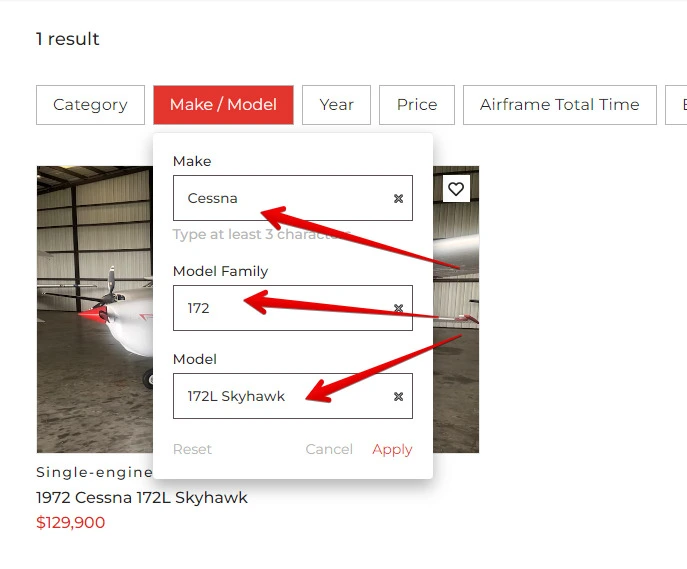
This grouped structure does two things at once. It helps users who know roughly what they want (“some kind of Cessna 172”) browse through the relevant family without leaving the search box. And it helps users who know exactly what they want (“a 172L Skyhawk specifically”) jump straight to the precise model.
Once a user selects an option below the “keyword” line at the top of the dropdown, the system doesn’t just run a text search – it applies structured filters directly on the search engine for marketplace results page. Selecting “Cessna 172L Skyhawk” populates three separate filter fields simultaneously: Make is set to “Cessna,” Model Family is set to “172,” and Model is set to “172L Skyhawk.” The results page then shows exactly the listings that match all three criteria, which for a specific model typically narrows a broad catalogue down to a single precise match — the exact 1972 Cessna 172L Skyhawk the buyer had in mind, not a page of loosely related Cessnas.
There’s also a second search for marketplace mode built into the same field. If a user ignores the suggestions and just types a raw keyword instead – say, an aircraft’s registration number – the system performs a strict match against listing titles and registration numbers. Type a specific tail number, and the search returns exactly the one listing it belongs to, pulling that registration straight out of a listing’s public-facing details. This dual-mode design means the same search plugin for marketplace serves two very different user intents: browsing by category, and looking up something the user already knows exists.


How Adding a Search Feature To a Website Improves the Marketplace Experience
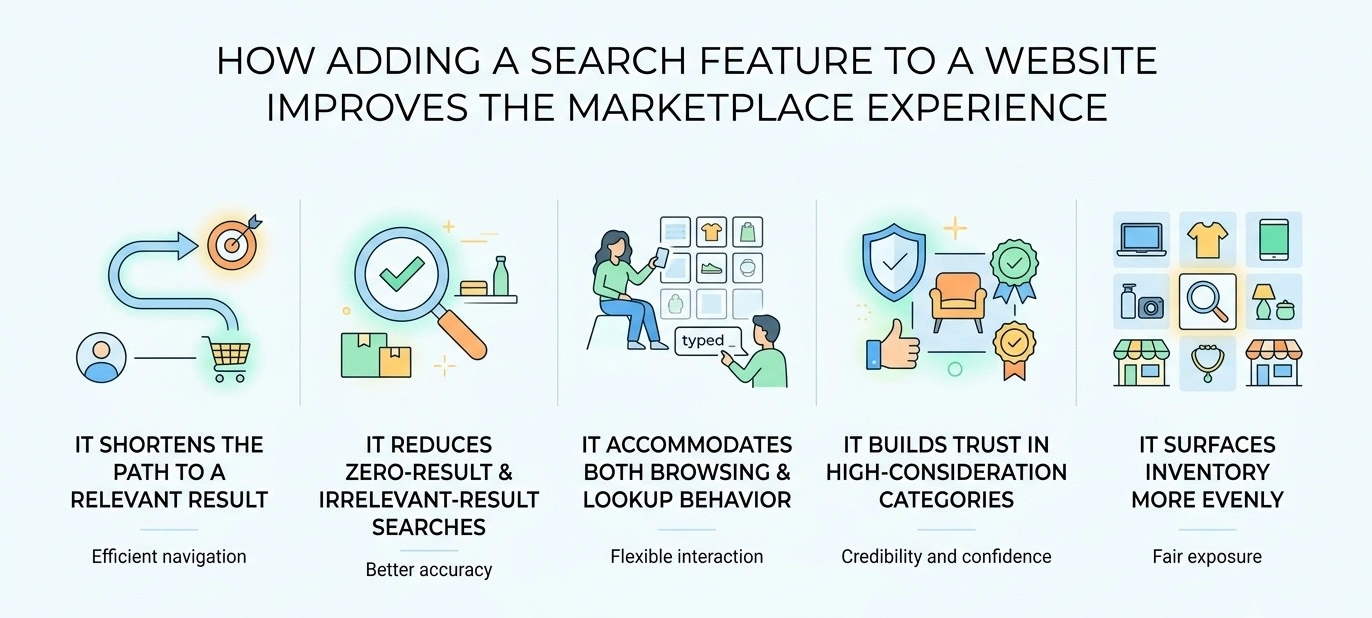
The value of this kind of search for marketplace shows up in concrete, measurable ways across the user journey.
It shortens the path to a relevant result
Instead of typing a term, scanning a long results page, and manually clicking through several filters to narrow things down, the user does both steps in one interaction. The grouped dropdown effectively pre-filters as they type. This is exactly what you want when you add search feature to website, a streamlined path from query to result.
It reduces zero-result and irrelevant-result searches
One of the most damaging things a search feature for website can do is show a user either nothing or a page of noise. Structuring the search for marketplace around real hierarchical data instead of loose text matching all but eliminates the mismatch between what a person types and what the system understands them to mean.
It accommodates both browsing and lookup behavior
Not every visitor knows precisely what they want. Some are exploring a category (“what Cessnas are available right now?”), while others are checking on one specific item they already have in mind (a registration number they saw in a listing elsewhere). Supporting both modes in a single interface avoids forcing users into a rigid search for marketplace pattern that doesn’t match their actual intent.
It builds trust in high-consideration categories
When someone is shopping for a $130,000 aircraft, a poorly functioning search doesn’t just annoy them – it makes them question whether the platform is a serious, well-built marketplace at all. Precise, well-organised results signal competence and reduce friction at exactly the moment a buyer is deciding whether to trust the platform with a major purchase.
It surfaces inventory more evenly
Grouped, hierarchical search for marketplace results give visibility to listings that might otherwise get buried by more generic keyword matches – a small but meaningful benefit for sellers whose specific models might not surface well in a flat text search.
How We Adapt Advanced Search to Different Marketplace Models
The aviation use case is a clean illustration of the pattern, but the underlying approach (hierarchical, attribute-driven search for marketplace with grouped suggestions) generalises well beyond aircraft. When we scope this kind of work for a new client, we look at the marketplace’s actual data structure and ask which hierarchy makes sense for their listings. A few examples of how this reshapes for different verticals:
- Vehicle and equipment marketplaces: Make → Model → Trim/Year, mirroring the aviation structure almost exactly, with year and condition often added as a fourth filter layer. When you add search feature to website for this vertical, the grouped suggestions need to respect automotive naming conventions.
- Real estate and property marketplaces: Region → Neighbourhood → Property Type → Specific Listing, where geographic hierarchy replaces the make/model structure but the same grouped-suggestion UX pattern applies. This is a prime example of creating website search feature that adapts to location-based data.
- Rental and equipment-sharing marketplaces: Category → Brand → Specific Item, useful for platforms renting anything from cameras to construction equipment, where users often search by brand name first.
- Service marketplaces: Service Category → Specialisation → Provider Attribute, adapting the pattern to skills and credentials instead of physical product specs. This approach to adding a friendly search feature to your website makes it easy for clients to find the right professional.
- Digital content or collectables marketplaces: Genre/Type → Creator or Series → Specific Item, which works well for marketplaces dealing in art, media, or licensed goods. The dynamic search website feature needs to accommodate creator names and series titles as key attributes.
The technical shape of the solution stays consistent across these adaptations – indexed hierarchical fields, a grouped autocomplete UI, and a fallback strict-match mode, while the specific data model, filter labels, and grouping logic get tailored to the marketplace’s actual catalogue. This is the kind of adaptation we build into most of our Sharetribe marketplace development engagements once a client’s catalogue reaches a size or complexity where default search stops being enough.
How the Feature Was Implemented
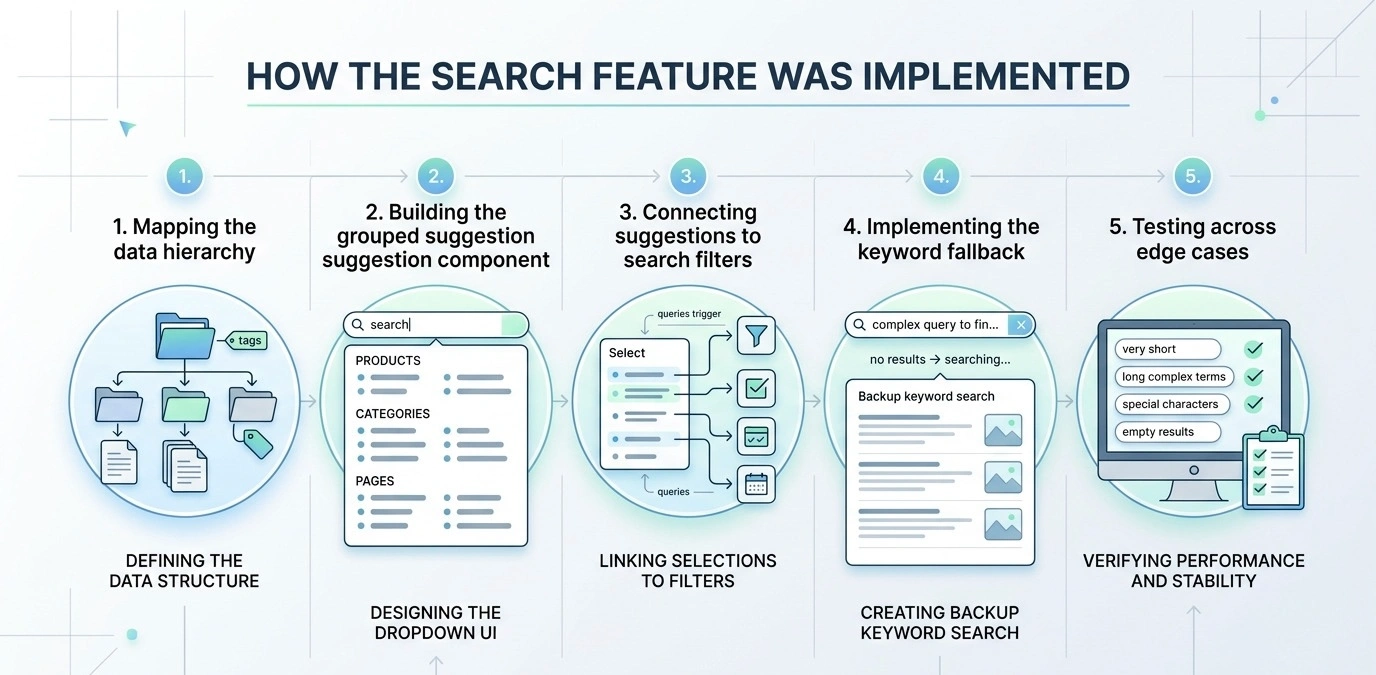
Building this kind of search engine for marketplace inside Sharetribe’s architecture means working within and around the platform’s existing search and filtering infrastructure rather than replacing it outright.
The implementation involved a few connected pieces of work:
1. Mapping the data hierarchy
Make, model family, and model needed to be identified and structured from the existing listing data, since Sharetribe doesn’t natively define a “model family” concept — it isn’t a separate table in the database by default. This turned out to be the trickiest part of the whole build: the team had to design a way to correctly map the search-option hierarchy on top of a data structure that wasn’t originally built to express it.
2. Building the grouped suggestion component
The search-bar dropdown needed custom front-end logic to query for matches across the hierarchy fields as a user types, then group and render the results by family and model rather than as a flat list. This is a key part of how to build a marketplace search engine that feels intuitive.
3. Connecting suggestions to search filters
Selecting a suggestion had to populate the corresponding Make, Model Family, and Model filters on the results page and immediately apply them, meaning the suggestion component and the filter component needed to communicate directly rather than operate as separate, disconnected UI pieces. When you implement search feature on website, this kind of tight integration is essential.
4. Implementing the keyword fallback
A separate matching path was needed for the plain-keyword case, performing a strict match against listing titles and registration numbers rather than the fuzzy, hierarchical logic used for make/model searches. This dual approach is what makes this a truly dynamic search website feature.
5. Testing across edge cases
With families, models, and shared naming patterns (many aircraft families share partial model numbers), thorough testing was needed to confirm that suggestions and filters lined up correctly and that the keyword fallback didn’t interfere with hierarchical matching. This attention to detail is what separates a good search plugin for marketplace from a great one.
All told, this was a relatively contained development effort for a feature that fundamentally changes how users interact with the catalogue. That’s the reality of most Sharetribe customisations: because the platform’s core transaction and listing engine is solid, teams that know it well can layer in fairly sophisticated custom features without a full-scale rebuild. It’s a similar story to how we’ve approached other non-standard functionality on Sharetribe projects, whether that’s building out Node.js development services for platform-level integrations or wiring up React development for custom-facing UI components like this one.
This approach is already live on Aircraft For Sale, proving it handles both structured make/model searches and precise registration lookups.
Advanced Search Is Only One of the Features We Can Build
Advanced search is a good example of the kind of work that falls outside what a standard Sharetribe template offers, but it’s far from the only one. Over roughly a decade of exclusive focus on the Sharetribe ecosystem and contributions to close to 100 Sharetribe-based marketplaces, our team has built custom features spanning nearly every part of the platform – from adding a search feature to a website to complex transaction workflows:
RFQ and Price Negotiation
For marketplaces dealing with complex products, we built a Request for Quote (RFQ) and Price Negotiation system. Users can request custom quotes, providers can respond with tailored pricing, and both parties can negotiate through integrated messaging.
Social Login Authentication
We’ve implemented social login for platforms like LinkedIn and Apple, in addition to the default Google and Facebook options. This lowers the barrier to entry and increases data accuracy.
Multi-Currency and Multi-Language Support
For global marketplaces, we implement multilingual and multicurrency functionality, like we did for SimList, which supports 5 languages and 15 different currencies. Beyond Sharetribe’s default machine translation, we leverage AI-powered translation tools to deliver more accurate, context-aware localizations.
Custom Payment and Payout Logic
We architect custom payment and payout logic for even the most intricate financial scenarios: multi-party transactions, tiered-commission structures, escrow-style holding, and immediate payouts.
Booking and Reservation Management Systems
For time-sensitive inventory, we build comprehensive booking and reservation management tools with real-time availability tracking, flexible pricing, buffer times, and automated reminders, ensuring seamless experiences for both bookers and providers.
Admin Panel Enhancements
We provide extensive admin panel enhancements with staff roles and permissions, listing approval workflows, advanced reporting, and user management tools, empowering your team to run operations efficiently.
Integrations with Third-Party Tools
We seamlessly integrate third-party tools for notifications (Twilio, SendGrid), support-related services (Zendesk), content management systems (CMS), CRM/ERP sync, and advanced analytics (Google Analytics 4, Mixpanel), extending your platform’s capabilities without reinventing the wheel.
Every one of these came out of a client’s specific business need rather than a generic feature request, which is really the point. Sharetribe’s flexibility means almost any workflow can be built on top of it, but knowing how to build it in a way that’s maintainable and doesn’t fight the platform’s core architecture is where deep, focused experience matters.
Do You Need Custom Search for Your Sharetribe Marketplace?
If your marketplace catalogue is still small and relatively uniform, the default Sharetribe search for marketplace will likely serve you well for a while yet – there’s no reason to over-engineer a feature your users aren’t struggling with. But a few signals tend to indicate it’s worth a serious look at custom search:
- Users regularly complain about not finding what they’re looking for, or support tickets mention search feature on website frustration
- Your catalogue has a natural hierarchy (brand, category, technical spec) that a flat keyword search for marketplace can’t represent
- You’re seeing high zero-result or low-engagement rates on your current search feature for website
- Your average transaction value is high enough that a frustrated searcher represents real lost revenue, not just a minor inconvenience
- Competitors in your niche already offer a more structured, guided search for marketplace experience
If any of that sounds familiar, it’s worth a conversation about adding a friendly search feature to your website. Roobykon has spent years building custom features on top of Sharetribe for marketplaces across a wide range of verticals, and search is one of the areas where a relatively focused investment tends to produce an outsized improvement in user experience.
When you’re ready to add advanced search feature to website, we know exactly what it takes. Our team has the experience to guide you through every step of the process, from planning to launch.
Is your marketplace ready to move past default search?
Get in touch with our team – we're happy to look at your specific catalogue and talk through what a custom search feature could look like for your platform.
Contact us
Recommended articles
 Why AI-generated marketplace MVPs break early, and what stops them from scaling
Marketplaces are complex systems. AI coding tools optimize for the prompt, not the long term, producing code that demos well but collapses under users. Roobykon Software examines the seven architectural failures that break AI-generated MVPs.
 Vibe coding for marketplaces: Where it works and where it fails
Vibe coding is exploding, but marketplaces are harder than they look. Discover the biggest mistakes founders make, how to use AI as an accelerator (not architect), and a safer path to launch.
 Social Login Authentication for Sharetribe Marketplaces
How to implement social login on Sharetribe: A step-by-step breakdown of what it really takes to add Apple, LinkedIn, and other providers. Includes common problems and proven solutions from marketplace experts.
 Comprehensive Google Calendar Integration Guide for Sharetribe Marketplaces
Stop double-bookings and save hours of admin time. Our guide shows you how to connect Google Calendar with Sharetribe, reduce admin work, and create a seamless booking experience for your providers and customers.