Why the Default Sharetribe Setup Isn’t Enough for Marketplace Cancellation
Mapping Out the Marketplace Cancellation Logic Before Writing a Line of Code
Extending the Transaction Process in Flex Console
Building an Admin Panel That Can Actually Pull the Trigger
Automating the Stripe Side: Refunds Without the Manual Math
What This Looks Like From the User’s Side
Common Pitfalls When You Try to Cancel a Transaction Yourself
Subscribe and you will promptly receive new published articles from the blog by mail
Bookings get canceled. Plans change. Providers become unavailable. These situations are unavoidable for any online marketplace, but how your platform responds makes all the difference. A poorly designed marketplace cancellation process can result in frustrated users, manual refund requests, accounting issues, and overwhelmed support teams. A well-designed one, on the other hand, keeps customers informed, automates payments, and enforces your business rules without intervention.
This article walks through how we approached a real Sharetribe cancellation policy implementation for one of our clients, an hourly-booking marketplace connecting brand ambassadors with event organizers. We’ll use it as a working example of how Sharetribe custom cancellation rules actually get built, what changes under the hood, and what to watch out for if you’re planning something similar.
- A cancellation policy marketplace rulebook should be mapped out scenario-by-scenario, with clear payment outcomes, before anyone opens the Flex Console.
- Real Sharetribe custom cancellation rules require you to extend the transaction process itself; the default templates don't include the states you need.
- To cancel a transaction safely after payment has moved past pre-authorization, you need dedicated transitions that chain the right Stripe actions in the right order.
- Sharetribe's Console isn't built for daily operations – a separate admin panel is the practical way to let non-technical staff issue a refund or cancel a booking without developer involvement.
- Sharetribe Stripe refund automation is best handled asynchronously: record the refund intent first, then process it via a scheduled job, rather than calling Stripe synchronously from a cancel button.
- A solid Sharetribe refund policy ties directly into your commission structure; decide who absorbs the Stripe fee as part of your fee model, not as an afterthought.
Why the Default Sharetribe Setup Isn’t Enough for Marketplace Cancellation
Sharetribe’s Template for Web comes with a transaction process that covers the basics: a booking gets requested, accepted, completed, or declined. That’s enough to launch a Sharetribe marketplace, but it’s not enough to run one at scale.
The Questions a Stock Transaction Process Can’t Answer
Real marketplaces need answers to messier questions:
- What happens if a customer cancels the night before a service is scheduled?
- What if the provider is the one backing out – should the penalty differ?
- Does timing matter? Is a cancellation 48 hours out treated the same as one made an hour before?
- Who absorbs the Stripe processing fee when money moves backward instead of forward?
- Can a marketplace operator step in and cancel on someone’s behalf – say, to resolve a dispute – without breaking the payment chain?
None of this is handled by a stock transaction process. If your marketplace involves scheduled time (bookings, appointments, rentals, gigs), you will hit this wall. The only real fix is Sharetribe transaction process customization, extending the state machine that governs how money and status move through a booking.
Why This Isn’t a “Nice to Have”
A vague or missing cancellation policy marketplace owners can point to isn’t just a UX gap – it’s a support cost, a trust cost, and eventually a legal one. Customers and providers both want to know, in advance, what happens if plans change. Building that certainty in is what separates a marketplace that scales gracefully from one that drowns in manual refund requests.
Mapping Out the Marketplace Cancellation Logic Before Writing a Line of Code
The instinct when a client says “we need cancellations” is to open the Flex Console and start drawing boxes. Don’t. The real work happens on a whiteboard (or, realistically, a shared spreadsheet) where you map every scenario against its payment outcome before anyone touches the transaction process editor.
Start With a Cases Table, Not Code
For our client’s marketplace, the rulebook of issuing a refund ended up looking something like this:
- Booking expires without action → payment goes to the customer by default.
- Booking accepted and completed normally → payment goes to the provider.
- Provider declines same-day → payment returns to the customer.
- Admin cancels on the customer’s behalf, within 24 hours of the booking → the provider still gets paid, since they held the slot in good faith.
- Admin cancels on the provider’s behalf, within 24 hours → full refund to the customer, and the marketplace absorbs the Stripe refund fee, since the provider is the one who dropped the ball.
- Admin cancels on the customer’s behalf, more than 24 hours out → customer gets refunded everything except the marketplace’s own commission; the Stripe fee comes out of the customer’s share.
- Admin cancels on the provider’s behalf, more than 24 hours out → full refund, with the marketplace covering the Stripe fee.

Notice the pattern: the further out you are from the booking, the more forgiving the policy gets, and whoever caused the cancellation carries more of the financial consequence. That’s not an accident – it mirrors how most reasonable people think fairness should work, and it’s a good starting template if you’re drafting your own cancellation policy marketplace rules.
Why Commission Rules and Cancellation Rules Have to Be Designed Together
This kind of logic connects directly to how you structure take rates and platform fees – if you haven’t nailed down your fee model yet, it’s worth reading our piece on custom commission rules for marketplace platforms before you finalize cancellation math, since the two are joined at the hip. A marketplace order cancellation policy that ignores your commission structure will eventually produce numbers that don’t reconcile, and that’s a much harder bug to catch than a broken button.
Extending the Transaction Process in Flex Console
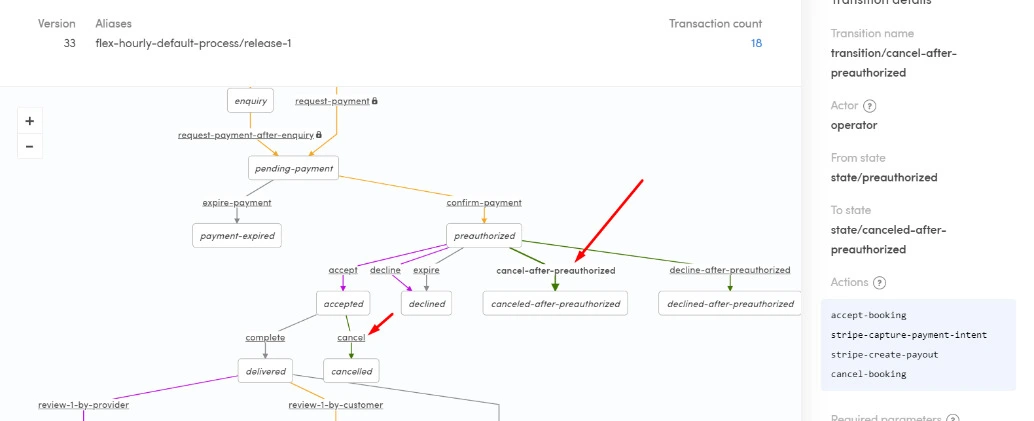
Once the rules are agreed, the technical work starts in earnest. Sharetribe’s transaction process lives in the Flex Console as a state machine – a diagram of every state a booking can be in (preauthorized, accepted, declined, cancelled, and so on) and every transition allowed between them. Understanding how to change transaction process in Sharetribe offers is the first step toward customizing the flow to match your business logic.
Two new transitions did most of the heavy lifting for this project:
- transition/cancel-after-preauthorized: used when a booking is cancelled before the provider has accepted it. At this stage, the payment is only pre-authorized, not captured, so cancelling is relatively clean.
- transition/cancel: used when a booking is cancelled after the provider has already accepted it, meaning money has moved further down the pipeline, and a proper refund needs to be issued rather than a simple authorization release.
Both transitions are triggered by the operator actor, meaning the marketplace admin, not the customer or provider directly, and both chain together a sequence of actions: accepting the booking, capturing the Stripe payment intent, creating the payout, and finally cancelling the booking. Getting that sequencing right is the difference between a refund that settles cleanly and a support ticket that escalates to a chargeback.
If you’re new to how Sharetribe structures these state machines in general, our breakdown of how to build a service marketplace checkout flow is a good primer – cancellation logic is really just the “unhappy path” cousin of the checkout flow you already designed.
Building an Admin Panel That Can Actually Pull the Trigger
Here’s something that surprises a lot of teams: Flex Console is not meant to be a day-to-day operations tool for your support team. It’s a developer-facing configuration panel. If you want your operations team to cancel bookings, issue refunds, and resolve disputes without filing a dev ticket every time, you need your own admin panel – built on top of Sharetribe’s Integration API, sitting outside the standard customer-facing marketplace UI.

For this project, that meant:
- Adding an isAdmin boolean field to a user’s protected data in Flex Console, so the marketplace codebase can gate access to the admin panel by user role rather than hardcoding a list of admin emails.
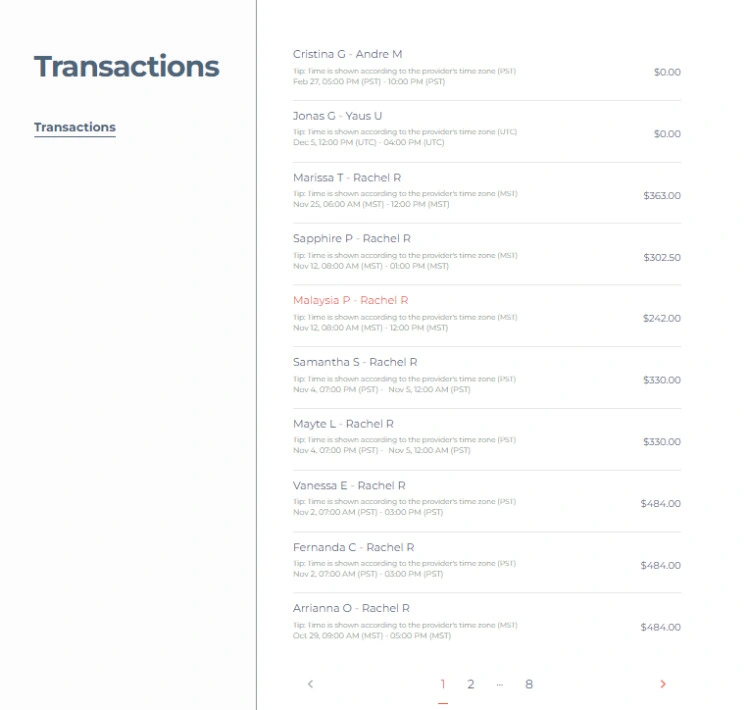
- Building a Transactions view inside the admin panel listing every booking, searchable and paginated, with enough detail (parties, time zone, amount) that support staff can locate the right transaction in seconds rather than digging through Stripe’s dashboard.
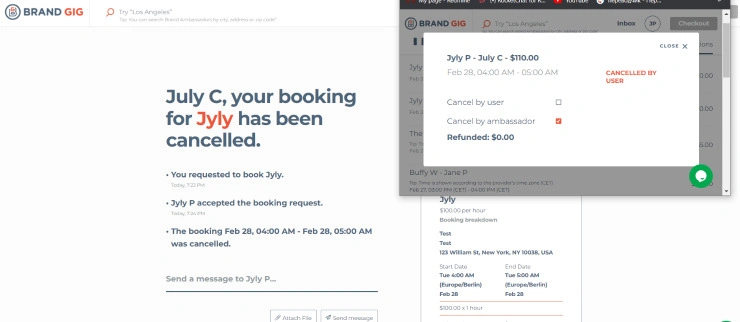
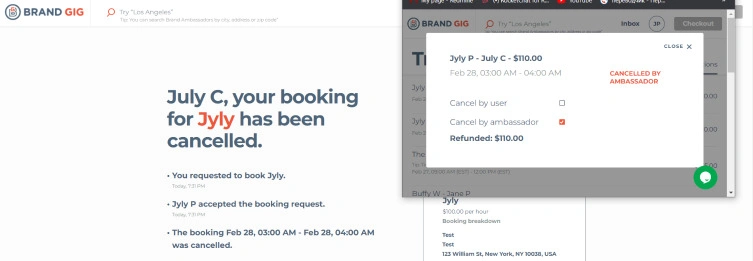
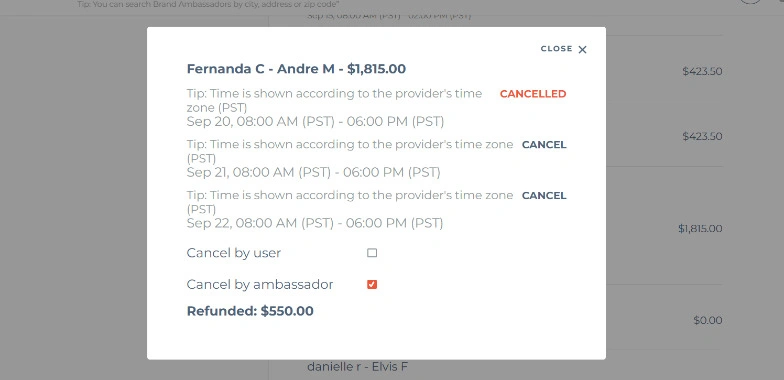
- Adding a cancellation modal on each transaction with two clear checkboxes – “Cancel by user” and “Cancel by ambassador” (in this case, the provider), so the admin records who triggered the cancellation, not just that a cancellation happened. That single piece of metadata is what lets the refund logic apply the right rule automatically instead of a human calculating percentages by hand.
This is the practical core of what a Sharetribe expert’s custom booking flow work usually means in practice – it’s rarely just about the transaction process diagram. It’s about wrapping that diagram in tooling that non-technical staff can actually use safely, without accidentally triggering the wrong Stripe action on a live payment.
Automating the Stripe Side: Refunds Without the Manual Math
This is where Sharetribe Stripe refund automation earns its keep. Manually calculating partial refunds, correctly assigning who eats the Stripe processing fee, and doing it all without ever double-refunding a transaction is exactly the kind of task you don’t want a tired support agent doing at 6 p.m. on a Friday.
The flow we built works in three stages:
- Record, don’t act immediately. When an admin cancels a booking, the system doesn’t try to call Stripe synchronously – that invites timeout errors and partial failures. Instead, it writes a record into a stripe_payment table in the marketplace’s own database, capturing the transaction ID, the Stripe payment_intent, the amount, currency, and how the commission should be split between customer and provider.
- Process on a schedule, not on demand. A cron job runs on a fixed interval, reads any unprocessed rows from that table, and calls Stripe’s refund API for each one. This decouples “the admin clicked cancel” from “money actually moved,” which makes the whole system far more resilient to Stripe hiccups or rate limits.
- Clear the queue. Once a refund succeeds, the corresponding row is cleared out, so the same refund never gets processed twice – a small detail, but the kind of detail that prevents a very bad support escalation.
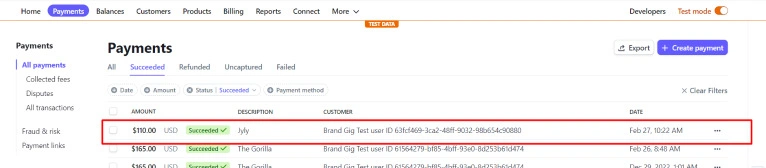
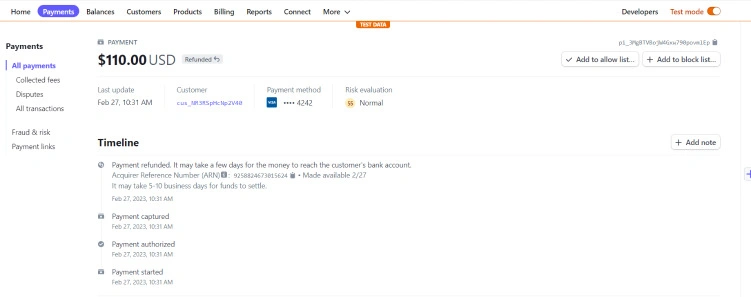
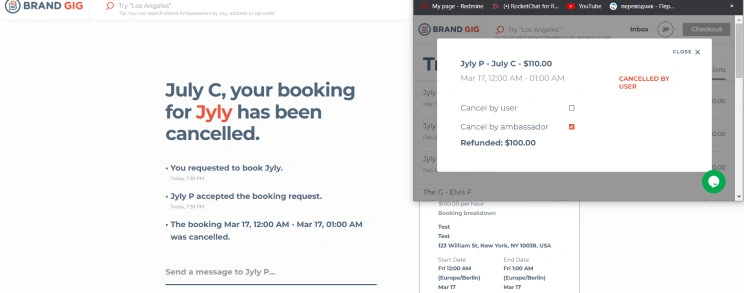
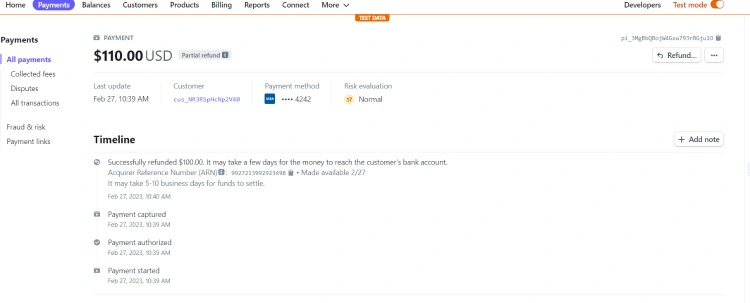
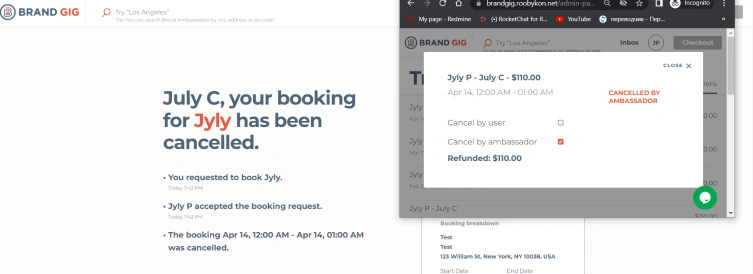
The result, from the outside, looks deceptively simple: a customer sees “Refunded: $110.00” in their conversation thread, Stripe’s dashboard shows a clean “Payment refunded” timeline entry, and nobody on either side has to think about the mechanics. That simplicity is the entire point – a good Sharetribe refund automation should be invisible when it works.
It’s also worth remembering that how you issue a refund through Stripe depends partly on which payment method was used at checkout – cards, wallets, and bank-based methods don’t all behave identically when reversed. If your marketplace supports multiple options, it’s worth cross-referencing our guide to payment methods available in Sharetribe so your refund logic accounts for the quirks of each.
What This Looks Like From the User’s Side
All that backend choreography should collapse into something almost boring for the end user. In the implementation we’re describing, cancelling a booking produces:
- A plain-language notification: “Your booking for [service] has been cancelled,” with a timestamped history of what happened (requested, accepted, cancelled).
- A visible label on the transaction – cancelled by user, or cancelled by provider – so there’s no ambiguity later about who initiated it.
- A refund amount that’s already calculated and displayed, no back-and-forth required.
On the Stripe side, every one of these shows up as a clean, auditable entry: payment started, authorized, captured, and finally refunded (fully or partially), with an Acquirer Reference Number for tracking. If a dispute ever does arise, that audit trail is what saves you.
Common Pitfalls When You Try to Cancel a Transaction Yourself
If you’re scoping this kind of work for your own marketplace, a few lessons from this build are worth flagging.
Financial Pitfalls
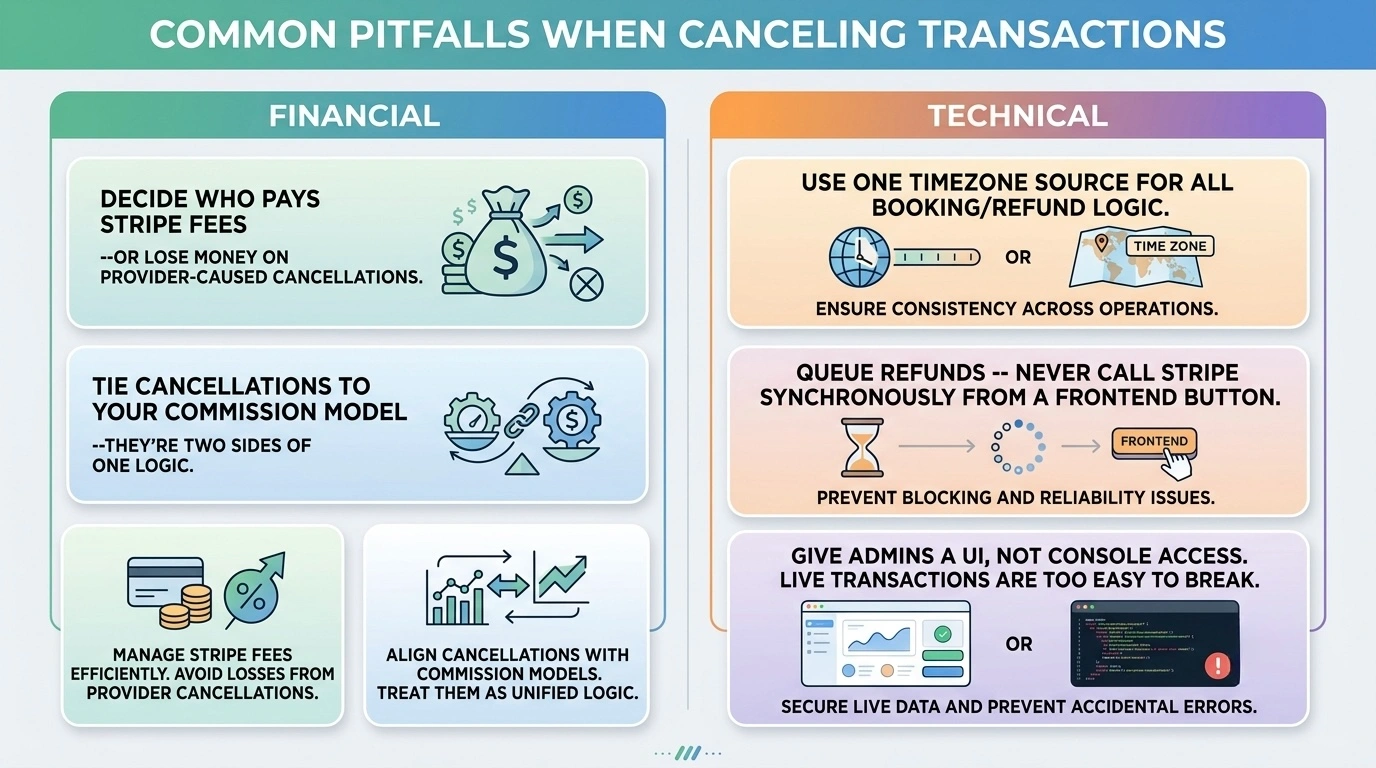
- Don’t skip the “who pays the Stripe fee” conversation. It seems like a small detail until your finance team notices the marketplace is quietly losing money on every provider-caused cancellation because nobody assigned that fee anywhere.
- Treat this as an extension of your commission model, not a separate feature. Cancellation refunds and platform commissions are two sides of the same financial logic – design them together.
Technical Pitfalls
- Time-based rules need a single source of truth for time zones. A booking scheduled in the provider’s local time and cancelled from an admin panel in a different time zone is a classic source of “why did this refund calculate wrong” bugs.
- Never call Stripe synchronously from a user-facing cancel button. Queue it. Process it asynchronously. Your future self, debugging a timeout at 2 a.m., will thank you.
- Give your admins a real interface, not console access. Letting operations staff into the Flex Console directly is how well-meaning people accidentally alter a transaction process that’s actively running live transactions.
Bringing It All Together
A well-built Sharetribe custom cancellation rules system touches almost every layer of your marketplace: the transaction process definition, your admin tooling, your Stripe integration, and the plain-English messaging your users actually read. None of those pieces are exotic on their own, but wiring them together correctly, so that a marketplace order cancellation resolves fairly and automatically regardless of who clicks the button, takes real Sharetribe and Stripe expertise.
If you’re weighing whether to build this yourself or bring in help, our team at Roobykon has done exactly this kind of transaction process customization and Stripe refund automation for multiple Sharetribe marketplaces – happy to talk through your specific cancellation scenarios.
Ready to automate cancellations in your Sharetribe marketplace?
Book a free consultation with our Sharetribe experts today. We'll map out your unique cancellation scenarios and build a custom solution that saves your team time and money.
Contact us
Recommended articles
 Sharetribe Reviews 2026: An Honest Look at the No-Code Marketplace Platform
Building a marketplace in 2026? Stop scrolling – this Sharetribe review is your reality check. We've crunched the numbers, analyzed real customer feedback, and mapped the platform against every marketplace type.
 Comprehensive Google Calendar Integration Guide for Sharetribe Marketplaces
Stop double-bookings and save hours of admin time. Our guide shows you how to connect Google Calendar with Sharetribe, reduce admin work, and create a seamless booking experience for your providers and customers.
 Integrating Sharetribe with Video Services: Jitsi, Twilio, Vonage, BigBlueButton, Zoom, Google Meet
Guide to Sharetribe video conference integration. Compare Jitsi, Twilio, Vonage, BigBlueButton, Zoom, and Google Meet for your marketplace. Learn how to embed video calls, assess costs, and implement secure, scalable video conferencing to enhance user experience directly on your Sharetribe platform.
 Custom Commission in Marketplaces: How to Set Different Fees for Hosts and Customers
Ditch the one-size-fits-all approach. This data-backed guide reveals the strategic framework for designing a dynamic fee structure that grows with your platform, maximizes revenue, and keeps both sides of your marketplace happy.