Subscribe and you will promptly receive new published articles from the blog by mail
What if your marketplace could run like a well-oiled machine, even while you sleep? Imagine a digital ecosystem where new members are automatically welcomed, bookings seamlessly sync to calendars, and every transaction triggers a perfect symphony of notifications and updates – all without you lifting a finger. This is the power of a Sharetribe Zapier integration, a tangible reality available to you today.
At Roobykon Software, we believe that the true power of your platform isn’t just in its core features, but in its boundless potential to connect. Understanding what Zapier integration is and how to leverage it is the first step toward transformative growth. This is especially true for Zapier for small business models, where efficiency is paramount.
By harnessing Zapier for businesses of all sizes, you can untether your Sharetribe marketplace from manual tasks. Learning how to automate your marketplace with Zapier unlocks a new dimension of growth, efficiency, and user delight.
Prepare to transform your Sharetribe marketplace from a static platform into a dynamic, self-operating engine of opportunity.
What Sharetribe and Zapier integration offers
The integration between Sharetribe Zapier opens up a universe of possibilities by connecting your marketplace to over 8,000 popular applications. When you explore the extensive Zapier integration list, you’ll discover countless ways to enhance your operations. This powerful connection enables you to create automated workflows, called “Zaps,” that respond to events in your marketplace and perform corresponding actions in other apps automatically. Essentially, Zapier allows different software systems to communicate and work together seamlessly, transforming how you manage your marketplace operations – this core concept of what is Zapier integration makes it invaluable for Zapier used in service businesses and marketplace platforms alike.
Key automation capabilities
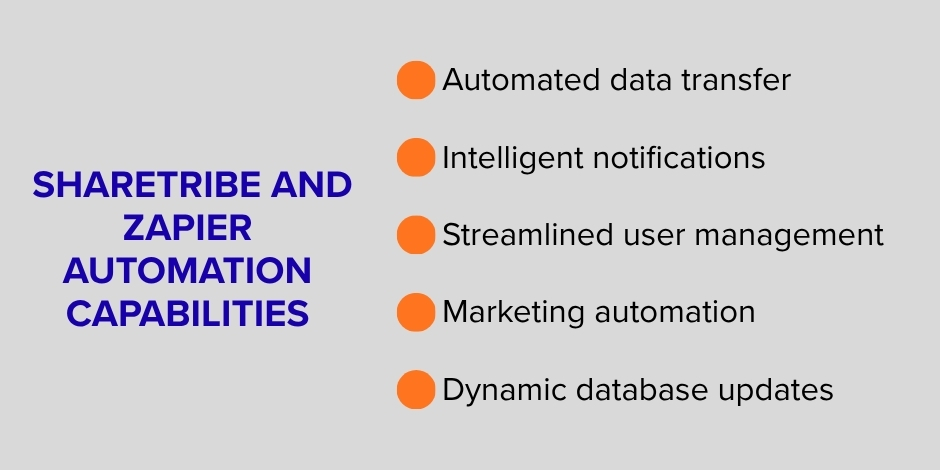
The Sharetribe Zapier integration can be harnessed to automate numerous critical business processes:
- Automated data transfer: Move information from your Sharetribe marketplace to other applications instantly, eliminating manual data entry
- Intelligent notifications: Enhance your communication strategy by integrating SMS notifications alongside standard emails
- Streamlined user management: Automate approval processes and permission assignments based on user type or other criteria
- Marketing automation: Sync new user signups directly to your email marketing platform to nurture relationships from day one, a classic example of the top Zapier integrations for business in action
- Dynamic database updates: Keep external systems in sync with your marketplace activity, such as updating CRMs or Google Sheets
The integration is particularly valuable because it extends your marketplace’s functionality without requiring custom development. While Zapier can modify data within your marketplace based on external triggers, we should note that it cannot change the actual user interface or how existing functionalities behave within Sharetribe.
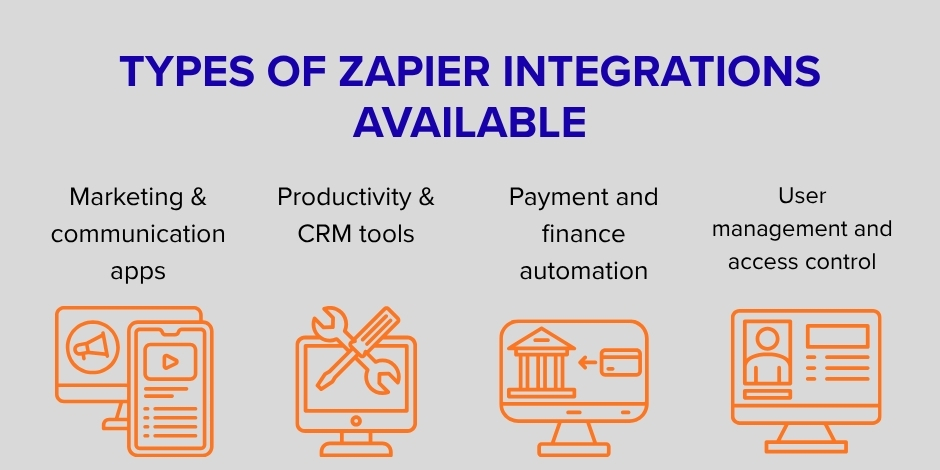
Types of Zapier integrations available
Below are some of the top Zapier integrations for business that can enhance your platform.
Marketing & communication apps
Enhance your marketing efforts and customer communication by connecting Sharetribe to popular marketing platforms. Automatically add new users to your email lists to ensure they receive your newsletters and promotions. Implement SMS notification systems that trigger based on marketplace events, providing instant updates to users who prefer text messages. These Sharetribe Zapier integrations help you maintain engagement with your community without manual intervention.
Productivity & CRM tools
Streamline your operations by connecting marketplace activity to productivity tools. Automatically create Google Calendar events from marketplace bookings to help providers manage their schedules. Sync user information and transaction data to Customer Relationship Management (CRM) systems to maintain comprehensive customer profiles. You can create Zapier integration workflows for these tasks, eliminating the need for double data entry and ensuring all your business systems remain synchronized.
Payment and finance automation
While Sharetribe handles marketplace payments internally, you can extend your financial workflows by automating data transfer to accounting systems. Send transaction details, commission data, or payout information to external bookkeeping software for streamlined financial management. This is a key item on any Zapier integration list for finance. Create automated workflows that trigger based on payment events in your marketplace.
User management and access control
Implement sophisticated user management automations that assign permissions based on user type. For example, automatically approve all customers while manually reviewing providers to maintain quality control. Create exclusive marketplaces by limiting access based on email domain, such as approving only university email addresses for a student-focused platform or corporate domains for an employee-only marketplace.
Benefits of using Zapier with your Sharetribe marketplace
- Eliminate repetitive administrative tasks: Zapier handles the mundane, time-consuming work of transferring data between systems, freeing up your time for strategic initiatives that grow your marketplace. By automating processes like user onboarding, notification sending, and data entry, you reduce manual errors and ensure consistent operation of critical business processes.
- Significant time savings: The automation of repetitive tasks translates directly into hours saved each week. What used to require manual copying and pasting between applications now happens instantly and automatically. This efficiency gain allows small teams to accomplish what would normally require a much larger staff, making your operation more scalable and cost-effective.
- Enhanced user experience: Automation allows you to provide timely, relevant communications that keep users engaged without increasing your administrative burden. From welcome messages to transaction updates, automated notifications create a seamless experience that builds trust and encourages repeat usage of your marketplace.
- Flexible feature expansion: Sharetribe Zapier integrations allow you to add new functionalities on top of Sharetribe’s core feature set without coding. This means you can adapt your marketplace to evolving business needs and user expectations by connecting specialized tools that address specific requirements, all while maintaining Sharetribe’s stable foundation.
- Scalable operations: As your marketplace grows, manual processes become increasingly burdensome. Zapier automation scales with your business, handling increased volume without additional effort on your part. This ensures your operational efficiency improves as your marketplace expands, rather than deteriorating under growing administrative load.
How easy it is to connect Zapier with Sharetribe
Setting up the Sharetribe Zapier integration is surprisingly straightforward. The process can be completed in just a few simple steps:
- Create your Zapier account: Visit Zapier’s website and sign up for an account. Zapier offers various plans, including a free tier that may be sufficient for your initial automation needs.
- Generate Sharetribe API credentials: In your Sharetribe Console, create a new application specifically for Zapier integration. Select ‘Integration API’ when prompted, and you’ll receive a Client ID and Client Secret. These credentials serve as a secure bridge between your marketplace and Zapier.
- Connect your accounts: In your Zapier dashboard, add a new connection and search for Sharetribe. Enter the Client ID and Client Secret you obtained from Sharetribe to authorize the connection.
- Choose your automation templates: Zapier provides pre-built templates for common Sharetribe workflows, or you can create custom Zaps from scratch. The template library includes automations for sending digital download links, adding users to mailing lists, and sending SMS notifications.
The entire Sharetribe Zapier setup process can be completed in minutes, and once configured, your automations will begin working immediately. Each environment in your marketplace (Live, Test, and Dev) has its own credentials, allowing you to safely test automations before deploying them to your production marketplace.
Example automation scenarios
Automated user onboarding and permissions
Create a seamless onboarding experience by automatically granting permissions based on user type. For instance, you can set up a “Zap” that automatically approves all customers the moment they sign up, while flagging new providers for manual review to guarantee high-quality supply.
To build this automation, you’ll use Zapier to connect your Sharetribe marketplace to your chosen email marketing platform (like Mailchimp, Sender, or ActiveCampaign). Here’s the flow:
- Trigger (Sharetribe): “New User Sign-Up”
- Action (Your Email Tool): “Add Subscriber to List” or “Send Welcome Email”
This instantly adds new users to your nurturing campaign, ensuring they receive welcome sequences and ongoing engagement from day one. This approach maintains a smooth customer experience while giving you complete quality control over your providers.
Provider payout reminder system
Chasing providers for payout information is a repetitive task that can easily be automated. Implement a system that sends timely, personalized email reminders to providers who haven’t completed their payout details after listing an item.
This sophisticated workflow leverages no-code AI automation within Zapier to create a smart reminder system, connecting your Sharetribe marketplace to an email service (like Gmail, Outlook, or a dedicated marketing platform).
- Trigger (Sharetribe): “New Listing Published”
- Delay: Wait for a set period (e.g., 3 business days) to give the provider time to act.
- Action (Zapier’s Filter or AI): Check if the “payout details” field in the listing is still empty. This is where no-code AI automation can intelligently parse the listing data to verify completeness.
- Action (Your Email Service): If the details are missing, automatically “Send Email” with a personalized reminder, including the listing title and a direct link to update their information.
Digital product delivery automation
For digital products marketplaces, ensure a smooth and instant delivery process. Create a system that automatically requests, verifies, and delivers digital product links without manual intervention.
This sophisticated flow connects Sharetribe to both a communication app (like Slack or email) and your backend database.
- Trigger (Sharetribe): “New Listing Created” for a digital product category.
- Action (Slack or Email): “Send a Direct Message” to the provider, automatically requesting they submit their download link via a form or a reply.
- Trigger (Form/Reply): Once the provider submits the link, another Zap is triggered.
- Action (Database/Sharetribe): The link is stored in a Google Sheet or a custom field within the listing.
- Trigger (Sharetribe): “New Transaction Completed.”
- Action (Email): The customer automatically receives an email with the verified download link.
This Zapier custom integration creates a seamless, hands-off delivery process while maintaining quality control through provider approval of each link.
Calendar synchronization for bookings
Eliminate scheduling conflicts and help your providers stay organized by automatically syncing marketplace bookings to their personal or business calendars.
This automation links Sharetribe directly to a calendar application like Google Calendar or Outlook Calendar.
- Trigger (Sharetribe): “Booking Confirmed.”
- Action (Google Calendar): “Create Detailed Calendar Event.”
- Data Mapping: The Zap automatically populates the event with all relevant details from the booking: title (e.g., “Service with [Customer Name]”), date, time, duration, and any special notes provided by the customer.
Exclusive marketplace access control
Create gated community marketplaces by implementing email domain restrictions that automatically approve or ignore users based on their email address. This is perfect for university-specific marketplaces, corporate internal platforms, or other exclusive communities.
Case Studies: Roobykon’s Zapier Integration Expertise in Action
Roobykon Software doesn’t just talk about automation. We build it. Here are two examples of how we’ve leveraged the power of Sharetribe Zapier integrations to solve unique challenges for our clients.
Semoto
Semoto is a dynamic blockchain marketplace that connects businesses with service providers, fostering a community built on shared knowledge and mutual growth. Behind this innovative platform, a seasoned team of experts curates the user experience, requiring real-time insights into platform activity.
The Roobykon solution:
We implemented tailored Zapier custom integrations to automate critical workflows behind the scenes. Now, the moment a new user joins or a service provider lists their skills, automated notifications are instantly sent to the marketplace owner. This makes platform management more efficient and responsive, allowing the team to focus on community engagement and strategic growth instead of manual monitoring.
Flying Markets (Aircraft For Sale)
Roobykon was tasked with building “Flying Markets” (now Aircraft For Sale), a unique marketplace for high-value aircraft. Given the monumental sums involved, the platform does not process payments; it facilitates connections, allowing buyers and sellers to negotiate directly.
The Roobykon solution:
Despite the custom payment workflow, we harnessed Zapier for businesses to automate essential administrative tasks. Zapier automates notifications to the marketplace owner for every new user registration and aircraft listing. This provides crucial visibility and ensures the platform operators can maintain a high-touch, secure, and responsive environment without being overwhelmed by manual checks, perfectly demonstrating how to automate a marketplace with Zapier even in specialized, high-stakes industries.
These case studies prove that no matter your marketplace’s niche or complexity, a strategic Sharetribe Zapier integration can be the key to unlocking new levels of operational efficiency.
Conclusion
Your Sharetribe marketplace is the foundation, but Zapier integration is the catalyst that propels it into a league of its own. Understanding how to use Zapier to automate your small business through these top Zapier integrations for business can fundamentally transform your operations.
For those with unique requirements, you can build Zapier integration connections or explore Zapier custom integration options to address specific workflow challenges. Learning how to integrate Zapier into website operations represents the future of efficient marketplace management. With advancements in no-code AI automation, these processes are becoming more accessible than ever.
But we know that setting this up can feel daunting. Where do you even start?
That’s where we come in. The team at Roobykon Software doesn’t just advise on these automations; when you hire Sharetribe developers from our team, we build them for you. If you’re excited by the possibilities but short on time or technical know-how, let us handle it.
We’ll help you:
- Identify the key tasks that are eating up your day.
- Design & build custom Zapier workflows that fit your unique business.
- Test & launch your automations, so everything works smoothly from day one.
The door to a smarter, more connected, and profoundly efficient Sharetribe Zapier marketplace is wide open. Your journey toward an automated future starts with a single step. Step through it today and discover why Zapier for businesses of all sizes has become the gold standard in workflow automation.
FAQ

ALL COMMENTS (1)
Recommended articles
 The First 6 Months: What to Expect After Launching Your Sharetribe Marketplace
Building a successful Sharetribe marketplace requires more than launch-day excitement. This article outlines a clear six-month action plan based on real-world metrics, behavior tracking, and user feedback to help marketplace operators scale intentionally and efficiently.
 Custom Car Rental Platform Development on Ruby on Rails or Quick Start with Sharetribe
Every car rental marketplace founder faces the same question: build a custom platform or start with a ready-made solution? Ruby on Rails offers flexibility, scalability, and advanced functionality, while Sharetribe provides speed and affordability. We compare both options, so you can make an informed choice that supports your long-term growth.
 How to Build a Mobile App for Your Sharetribe Marketplace
Your marketplace deserves more than just a mobile-friendly site — it needs a true app experience. In this guide, we’ll show you how to build a Sharetribe mobile app by combining Sharetribe’s backend with a custom mobile frontend.
 How to Track and Reduce Your Marketplace’s Carbon Footprint
Over 1,000 companies are pledging net-zero goals, and digital platforms are next. Discover practical ways to measure and lower your marketplace’s carbon footprint from the codebase to the cloud.






Great!